
Spring Module Integration in a Mule Application (Mule 4)
In this article, we will use a database datasource that is created by spring beans. Also, we will invoke one bean's method from mule flow.

The Spring module enables Mule apps to use the Spring framework. In this article, we will use a database datasource that is created by spring beans. Also, we will invoke one bean’s method from a Mule flow.
Step by step
1 - Create Mule Project: Go to Anypoint Studio and create a new Mule project.
2 - Add spring module: In Anypoint Studio, the Spring module is provided in the default configuration. In the Mule Palette, click on add modules, search for Spring and add this module to your project.
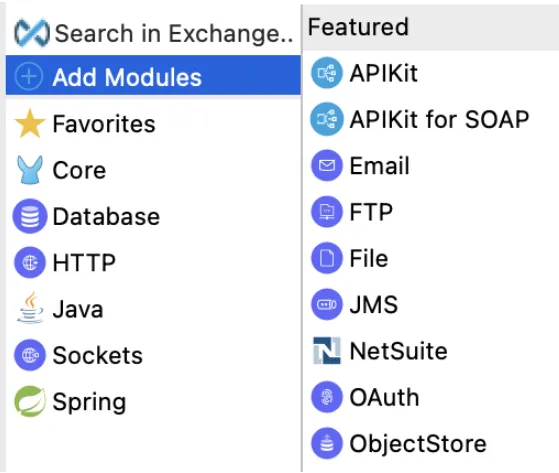
3 - Spring config: Go to spring config, add name as Spring_Config and provide files as beans.xml
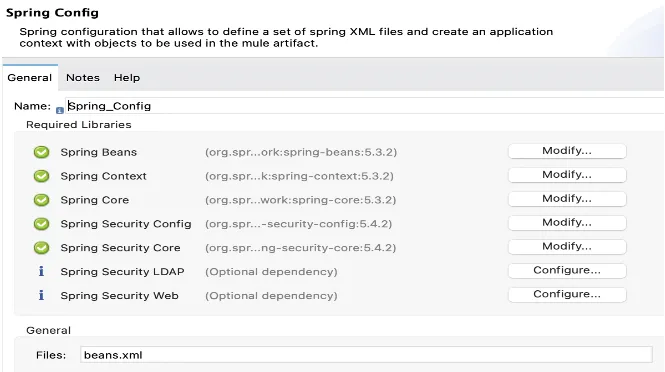
4 - Spring Beans: Create a beans.xml file under src/main/resources. Add the below configuration in this file.
<beans xmlns="http://www.springframework.org/schema/beans" xmlns:context="http://www.springframework.org/schema/context"
 xmlns:xsi="http://www.w3.org/2001/XMLSchema-instance" xmlns:jdbc="http://www.springframework.org/schema/jdbc"
xsi:schemaLocation="http://www.springframework.org/schema/beans
     http://www.springframework.org/schema/beans/spring-beans-4.2.xsd
     http://www.springframework.org/schema/jdbc
     http://www.springframework.org/schema/jdbc/spring-jdbc-4.2.xsd
     http://www.springframework.org/schema/context
     http://www.springframework.org/schema/context/spring-context-4.2.xsd
     http://www.springframework.org/schema/security
     http://www.springframework.org/schema/security/spring-security-4.2.xsd">
</beans>
5 - Spring JDBC: Add spring JDBC and PostgreSQL dependency and shared library in pom.xml
<dependency>
    <groupId>org.springframework</groupId>
    <artifactId>spring-jdbc</artifactId>
    <version>5.3.2</version>
</dependency>
<dependency>
    <groupId>org.postgresql</groupId>
    <artifactId>postgresql</artifactId>
    <version>42.3.4</version>
</dependency>
Add below shared library in the shared libraries tag.
<sharedLibrary>
   <groupId>org.springframework</groupId>
   <artifactId>spring-jdbc</artifactId>
</sharedLibrary>
<sharedLibrary>
   <groupId>org.postgresql</groupId>
   <artifactId>postgresql</artifactId>
</sharedLibrary>
6 - Spring JDBC Beans: Add spring Datasource bean configuration in beans.xml.
<bean id="dataSource" class="org.springframework.jdbc.datasource.DriverManagerDataSource">
 <property name="driverClassName" value="org.postgresql.Driver" />
 <property name="url" value="${spring.datasource.url}" />
 <property name="username" value="${spring.datasource.username}" />
 <property name="password" value="${spring.datasource.password}" />
</bean>
7 - Application Properties: Add below application properties for JDBC connection in src/main/resources. You can replace the correct username, password, and database name in the below properties.
spring.datasource.url=jdbc:postgresql://localhost:5432/spring
spring.datasource.username=username
spring.datasource.password=password
8 - Database Config: Go to Mule Palette and drag the database connector. Configure the database configuration in global.xml with the datasource and select the PostgreSQL jar for the JDBC driver.
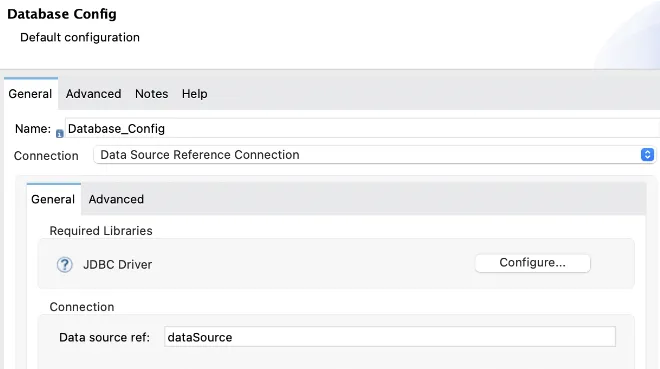
Test the configuration, this should return a successful connection.
9 - HTTP Listener for accounts: Add an HTTP listener and configure it with the default settings. Add a Select DB configuration and a Select query for the accounts table. Make sure the account table is created in your database and there will be at least one entry for the account table. Add a transformer to give the result in JSON format.
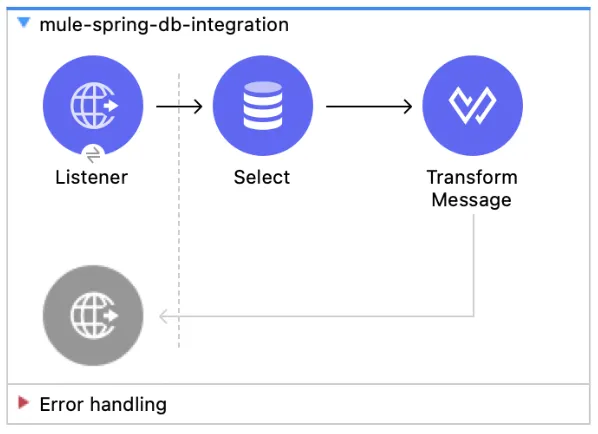
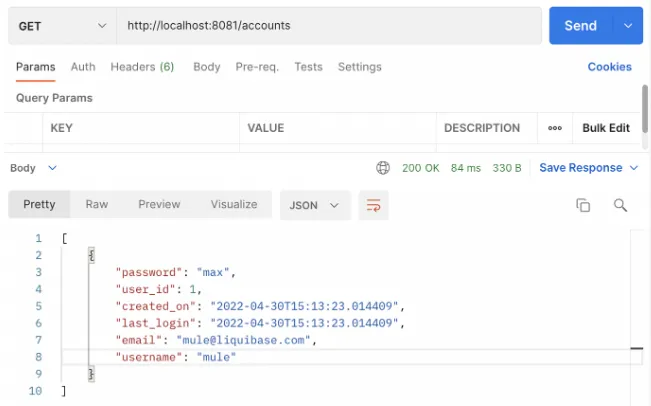
10 - Invoke: Run the mule application and invoke the endpoint to see the result. This will return records from the accounts table.
11 - Create Spring Beans: Create User POJO class, UserService interface, and UserServiceImpl service implementation class.
package com.shyam.model;
public class User {

 private String firstName;
 private String lastName;
 private String email;
 public String getFirstName() {
   return firstName;
 }
 public void setFirstName(String firstName) {
   this.firstName = firstName;
 }
 public String getLastName() {
   return lastName;
 }
 public void setLastName(String lastName) {
   this.lastName = lastName;
 }
 public String getEmail() {
   return email;
 }
 public void setEmail(String email) {
   this.email = email;
 }
}
package com.shyam.service;
public interface UserService {
public String sayHello();
}package com.shyam.service;
import com.shyam.model.User;
public class UserServiceImpl implements UserService {
private User user;
@Override
public String sayHello() {
return "Hello from " + user.getFirstName();
}
public User getUser() {
return user;
}
public void setUser(User user) {
this.user = user;
}
}12 - Spring Bean Configuration: Add below spring bean configuration for User and UserServiceImpl class in beans.xml.
<bean id="user" class="com.shyam.model.User">
   <property name="firstName" value="Shyam" />
 </bean>
<bean id="userService" class="com.shyam.service.UserServiceImpl">
   <property name="user" ref="user" />
 </bean>
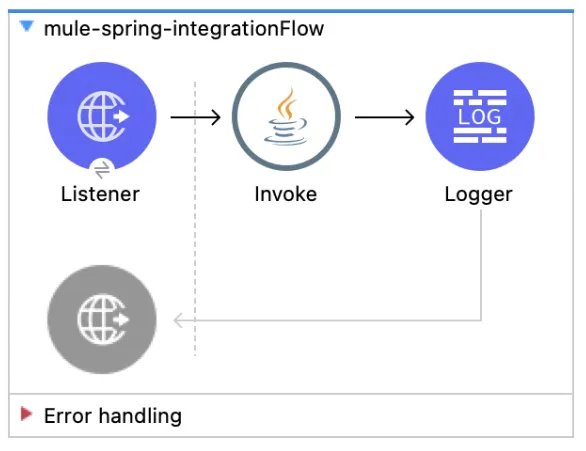
13 - Mule flow: From a Mule flow it’s very simple to access one of the previously created beans. It just uses an Invoke component to call the Spring bean’s function.
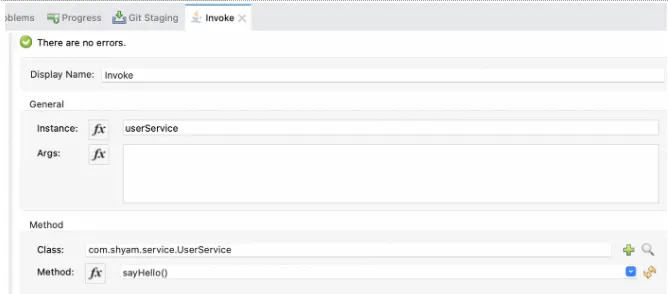
14 - JAVA Invoke: In the Invoke component in the Mule application, we are simply calling the sayHello() method of the UserServiceImpl. Here is the screenshot of the configuration of the Invoke component:
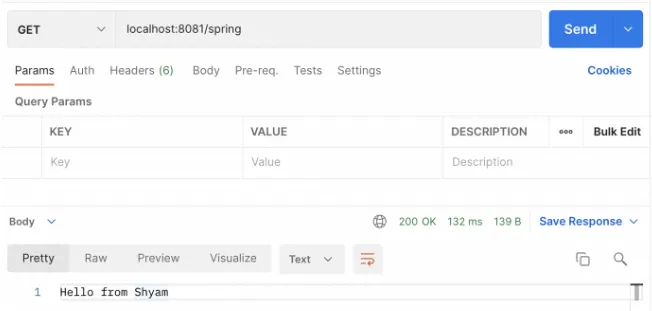
15 - Invoke: Invoke the endpoint and see this will return Hello from Shyam, which we have configured the first name in beans property.
GitHub repository
References
FAQs
Frequently asked questions about this post.
-
How do I add the Spring module to a Mule 4 project?
In Anypoint Studio the Spring module is provided in the default configuration, so you open the Mule Palette, click add modules, search for Spring, and add the module to your project.
-
What goes in the Spring config in Anypoint Studio?
In the Spring config you set the name to
Spring_Configand provide the files asbeans.xml, wherebeans.xmlis a file you create undersrc/main/resources. -
Which dependencies and shared libraries are needed for the Spring JDBC datasource?
You add the
spring-jdbcandpostgresqldependencies inpom.xml, and you also add bothspring-jdbcandpostgresqlas shared libraries inside the shared libraries tag. -
How does the Mule flow connect to the PostgreSQL database created by the Spring beans?
The Spring
dataSourcebean (aDriverManagerDataSource) reads its url, username, and password from the application properties, and then in the Database Config you use a Data Source Reference connection pointing to thatdataSourcebean and select the PostgreSQL jar for the JDBC driver. -
How do I call a Spring bean's method from a Mule flow?
It is very simple from a Mule flow: you use an Invoke component to call the Spring bean's function, for example calling the
sayHello()method on theuserServiceinstance, which returns "Hello from Shyam" because Shyam is configured as the first name in the bean property.