
Keep Your .claude Folder Private with a Git Submodule
Split your .claude/ config into a private repo while your project stays public: a git submodule plus a CLAUDE.md symlink so Claude Code still finds it.
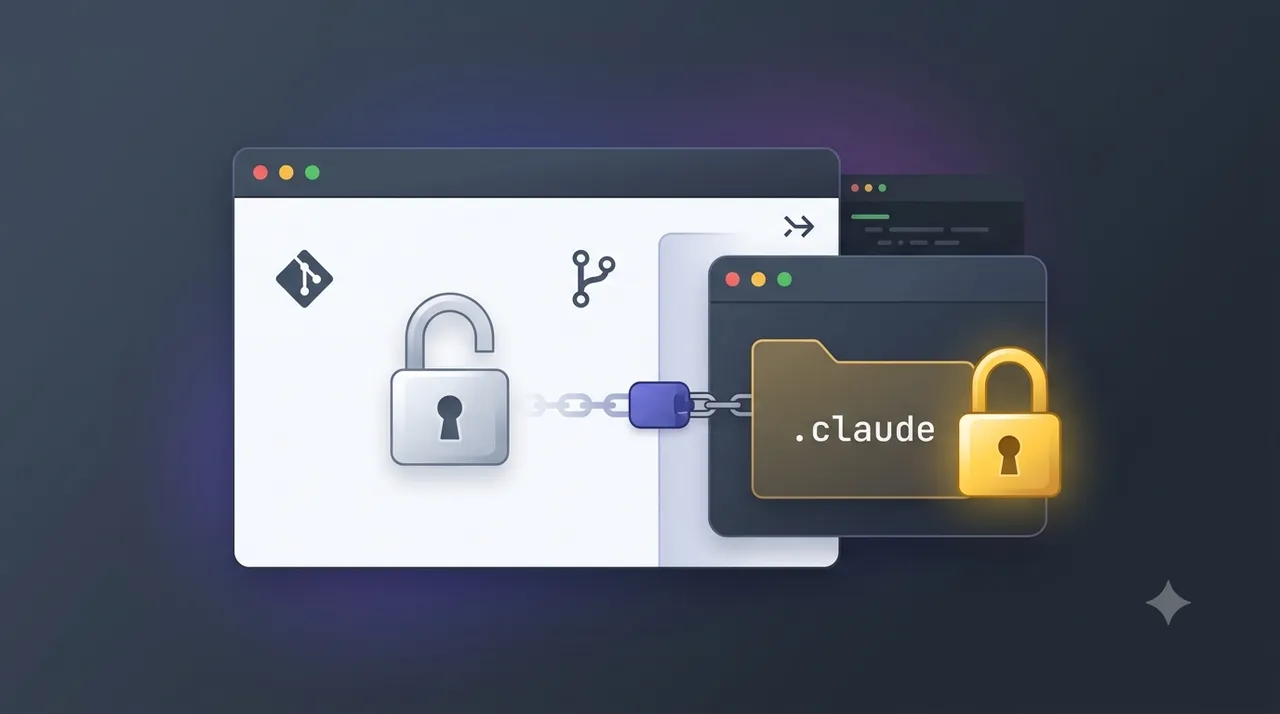
I build in the open. This site’s whole codebase is a public GitHub repo, and I like it that way. But my .claude/ folder is a different story. It holds the skills, subagents, and CLAUDE.md instructions I’ve spent months tuning, plus notes I’d rather not hand to a scraper. I wanted the project public and that one folder private.
The fix is a git submodule.
.claude/ becomes its own private repo, wired into the public project. That folder holds all my AI agent skills, subagents, and instructions, so keeping it private matters. There’s one snag with CLAUDE.md that I’ll walk you through, because Claude Code expects it at the repo root but I want the real file inside the private folder. A relative symlink solves it.
This is exactly how prostdev.com is set up. Here’s the whole thing, start to finish.
Tip
You can follow these steps by hand, or you can hand them to your AI. Every step below is a plain command with the reasoning spelled out, so a coding agent like Claude Code can run the whole thing for you. If you go that route, paste the steps in, tell it your GitHub owner and the repo names you want, and ask it to stop and check with you before it creates the private repo or force-pushes anything. Those are the two steps you don’t want an agent doing unsupervised.
Note
This guide is written for macOS and Linux. The CLAUDE.md symlink step relies on POSIX symlinks, which Windows checkouts don’t always materialize the same way.
What you’ll end up with
Two repos instead of one:
- A public repo. Your actual project (this site, in my case). Anyone can read it.
- A private repo. Just the contents of
.claude/: your skills, agents, docs, and the realCLAUDE.md.
The private one is pulled into the public one as a submodule at the .claude/ path. To anyone browsing your public repo, .claude looks like a pointer to a commit in another repo. They can’t see what’s inside unless you grant them access.
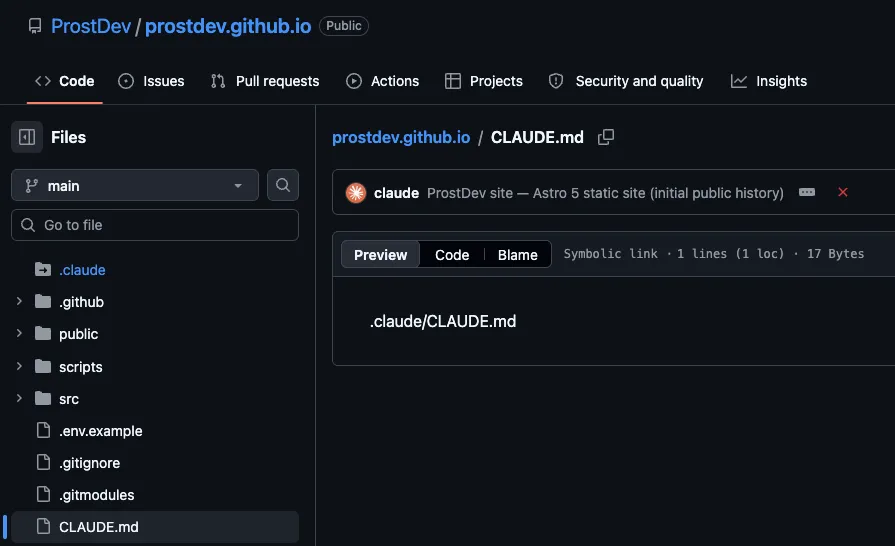
Two extra payoffs beyond privacy. First, you can reuse that internal config across projects. Point a second project’s submodule at the same private repo and every skill comes along. Second, your .claude/settings.json (which can hold machine-specific paths) stays out of both repos entirely, which I’ll cover near the end.
Before you start
You’ll need the GitHub CLI (gh) authenticated, and a project that already has a .claude/ folder with real content in it. Confirm gh is signed in:
gh auth statusIf that prints your account, you’re good. Everything below runs from the root of your public project.
Warning
A few of these steps rewrite git history and delete the local .claude/ folder before re-adding it. Commit or stash any uncommitted work first, and don’t run this on a folder whose contents you haven’t pushed somewhere safe.
Step 1: Move the real CLAUDE.md inside .claude
Claude Code reads CLAUDE.md from your project root. But I want the real file versioned in the private repo, so it needs to live inside .claude/. We’ll reconcile that with a symlink in a later step. For now, move it in:
git mv CLAUDE.md .claude/CLAUDE.mdIf your CLAUDE.md wasn’t tracked yet, use plain mv instead. If you already keep it at .claude/CLAUDE.md, skip this step. Either way, the source of truth is now .claude/CLAUDE.md.
Step 2: Ignore your settings files in both repos
settings.json and settings.local.json hold per-machine and personal config (local paths, permission choices). They shouldn’t live in either repo. Add them to the .gitignore inside .claude/:
# Claude Code: ignore personal/local settings (keep shared skills/agents/CLAUDE.md)
settings.json
settings.local.json
.DS_Store
Then make sure your project root’s .gitignore ignores them too, so they can’t sneak in from the top:
settings.json
settings.local.json
If either file is already tracked, untrack it without deleting your copy on disk:
git rm --cached .claude/settings.json .claude/settings.local.jsonThe --cached flag is the important part. It removes the file from git’s index but leaves the actual file sitting in your folder, working as before.
Step 3: Create the private repo from your .claude contents
Now we give .claude/ its own git history and push it to a new private repo. To avoid disturbing the main project’s git state, do this in a throwaway copy of the folder, outside your project tree:
cp -R .claude /tmp/claude-internal
cd /tmp/claude-internal
rm -rf .git          # drop any leftover git metadata from the copy
git init
git add -A
git commit -m "Initial import of .claude internal config"
Add a short README.md first if the folder doesn’t have one, so the repo isn’t bare. Then create the private repo and push, using gh:
gh repo create your-name/project-internal --private --source=. --remote=origin --pushSwap your-name/project-internal for the owner and name you want. --private is what keeps it locked down, --source=. points it at this folder, and --push sends the commit up immediately.
Important
This is the one step that publishes something. Double-check the repo name and the --private flag before you run it. Everything before this was local.
Step 4: Replace the local folder with a submodule
Back in your public project, remove the plain .claude/ folder from git and re-add it as a submodule pointing at the repo you just created:
cd /path/to/your/public/project
git rm -r --cached .claude
rm -rf .claude
git submodule add https://github.com/your-name/project-internal.git .claude
The git rm -r --cached stops tracking the folder’s files directly. The rm -rf clears the local copy (it’s safe now, everything is up in the private repo). And git submodule add clones the private repo into .claude/ and records the link.
You’ll see a new .gitmodules file. It should look like this:
[submodule ".claude"]
	path = .claude
	url = https://github.com/your-name/project-internal.git
Confirm the submodule is healthy:
git submodule statusA line beginning with a space and a commit hash, ending in (heads/main), means the submodule is checked out and clean.
Step 5: Recreate CLAUDE.md as a symlink
Here’s the trick that ties it together. The real file is now at .claude/CLAUDE.md, but Claude Code looks for CLAUDE.md at the project root. So we create a symlink at the root that points into the submodule:
ln -s .claude/CLAUDE.md CLAUDE.mdUse the relative target .claude/CLAUDE.md, not an absolute path. A relative link resolves no matter where the repo is cloned; an absolute one would break on anyone else’s machine. Verify it:
ls -la CLAUDE.mdYou should see something like CLAUDE.md -> .claude/CLAUDE.md, and the file will be tiny (about 17 bytes, the length of the target path). That’s the tell that it’s a symlink and not a copy. Reading it should show your real instructions:
cat CLAUDE.md # prints the content of .claude/CLAUDE.md through the linkNow stage it. Git stores a symlink as a special entry (mode 120000), not as a duplicate of the file’s contents:
git add CLAUDE.mdWhen you commit, git ls-files -s CLAUDE.md will confirm the 120000 mode. That’s how you know git recorded the link itself rather than inlining the file.
Step 6: Learn the two-repo commit rule
From here on, your project is two git repos, and where a file lives decides which one you commit to.
- Edit a project file (source code, a config, a blog post)? That’s one ordinary commit in the public repo.
- Edit an internal file (a skill, a subagent, a doc, or
CLAUDE.md)? That’s a two-step commit.
The internal edit goes inside the submodule first, then the public repo records the new pointer:
# 1. Commit inside the submodule
git -C .claude add CLAUDE.md
git -C .claude commit -m "Tweak instructions"
git -C .claude push

# 2. Bump the gitlink pointer in the public repo
git add .claude
git commit -m "Bump .claude submodule pointer"
The submodule commit has to exist and be pushed before the public repo points at it, or you’ll reference a commit nobody else can fetch. When you run git status in the public repo and see modified: .claude (new commits), that’s not a stray change. It’s git telling you the pointer is behind and you still owe step 2.
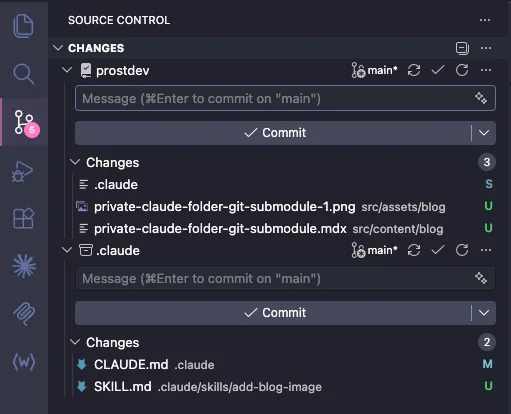
For example, this is how the Source Control tab looks like in my local once I’ve modified files in the .claude/ folder. First, I have to commit the files at the bottom (.claude), and then the files at the top (prostdev). Note how the .claude change at the top has an S for Submodule.
Step 7: Fix the clone gotcha
There’s one catch that trips up everyone, including future you on a new laptop. A normal git clone of your public repo brings down an empty .claude/ folder. The submodule contents don’t come automatically.
Clone with the submodule in one shot:
git clone --recurse-submodules https://github.com/your-name/your-project.gitAlready cloned the plain way? Pull the submodule in after the fact:
git submodule update --initBecause this bites everyone, say so in your public repo’s README. A single line (“clone with --recurse-submodules”) saves the next person a confused ten minutes wondering why Claude Code has no skills.
Purge the private files from your git history
Step 4’s git rm -r --cached .claude stops git from tracking those files going forward. It does not remove them from the commits you already made. Git history is append-only by default, so every earlier commit still holds the full contents of .claude/, viewable by anyone who checks out an old commit. If the whole point is privacy, “untracked from now on” is not enough.
The ideal is to never let the internal files reach the public repo’s history in the first place: do this split before your first commit, or at least before you push. When that ship has already sailed, here’s what to do based on where you are.
Important
Removing a file from the latest commit is not the same as removing it from history. Until you rewrite history, git log and any old checkout still expose it.
If they never got committed
Best case. If .claude/ was gitignored or split out before your very first commit, there’s nothing in history to clean. Confirm it:
git log --all --oneline -- .claudeNo output means the path never appeared in a commit, and you’re done.
If they’re only local and not pushed yet
This is the easy one, because rewriting history is safe when nobody else has your commits. The bulletproof move is to collapse everything into one fresh commit of the current, correct state (symlink plus submodule, zero private files). You lose your old commit messages, but you get a guaranteed-clean history:
git checkout --orphan clean-history   # a new branch with no parent
git add -A
git commit -m "Public project (private .claude lives in a submodule)"
git branch -D main                    # drop the old history
git branch -m clean-history main      # promote the clean branch to main
Because you started from an orphan branch, the new main has exactly one commit and no trace of the old .claude/ files. You never pushed, so there’s nothing to force and nobody to coordinate with.
If they were already pushed
Now the files are public, and two things are true. First, you have to rewrite history and force-push it. Second, and this matters more: treat anything sensitive in those files as already leaked. Clones, forks, and GitHub’s own caches may still hold the old commits, so rotate any API keys, tokens, or secrets that were exposed. A history rewrite is not a substitute for rotation.
To rewrite while keeping the rest of your history, use git-filter-repo (install it once with brew install git-filter-repo):
git filter-repo --path .claude --invert-pathsThat strips every .claude/ entry from every commit. It also rewrites all your commit hashes and drops the origin remote as a safety check, so re-add your remote, re-wire the submodule (repeat Step 4), then force-push:
git remote add origin https://github.com/your-name/your-project.git
git push --force origin main
Don’t want to keep the old history at all? The orphan-branch reset from the previous section works here too. Just add git push --force origin main at the end, and warn anyone else who cloned the repo, because their history no longer matches yours.
Caution
A force-push rewrites shared history. If other people have cloned or forked the repo, coordinate with them first. And whatever you do, rotate any secret that was ever pushed. Removing it from history does not un-leak it.
Wrapping up
That’s the whole pattern: a private submodule at .claude/, a relative CLAUDE.md symlink so Claude Code still finds its instructions, settings files ignored in both repos, a two-step commit for anything internal, and a clean history with none of those private files ever committed to the public repo. The upfront cost is one afternoon of git wrangling. What you get back is a project you can develop fully in the open without publishing the config you’ve invested real time in, and an internal toolkit you can drop into the next project by pointing a new submodule at the same private repo.
If you set this up and Claude Code suddenly can’t see your skills, the first thing to check is whether the submodule actually populated. Run git submodule status and ls .claude/ before you debug anything fancier.
FAQs
Frequently asked questions about this post.
-
Why put .claude in a separate private repo instead of just gitignoring it?
Gitignoring the folder would keep it off GitHub, but then it isn't version-controlled or shareable at all. A private submodule keeps your skills, agents, and
CLAUDE.mdunder real version control and lets you reuse the same internal config across projects, while your main project repo stays fully public. -
Why does the root CLAUDE.md need to be a symlink?
Claude Code reads
CLAUDE.mdfrom your project root, but the real file lives inside.claude/so it's versioned in the private repo. A relative symlink at the root (CLAUDE.mdpointing to.claude/CLAUDE.md) satisfies both: Claude Code still finds it at the root, and the content stays in the private submodule. -
Why use a relative symlink target instead of an absolute path?
A relative target resolves no matter where the repo is cloned. An absolute path would point at one specific location on your machine and break for anyone else who clones the project, or for you on a different computer.
-
How do I commit a change to a skill or CLAUDE.md now?
It's a two-step commit. First commit and push inside the submodule (
git -C .claude committhengit -C .claude push), then commit the updated pointer in the public repo (git add .claudeand commit). The submodule commit has to be pushed before the public repo points at it. Seeingmodified: .claude (new commits)in the public repo means you still owe that second step. -
Why is my .claude folder empty after cloning the project?
A normal
git clonebrings down an empty submodule folder. Clone withgit clone --recurse-submodules, or if you already cloned, rungit submodule update --initto populate it. It's worth noting the--recurse-submodulesflag in your README so the next person doesn't get stuck. -
Does git rm --cached remove the private files from my history?
No.
git rm --cachedonly stops tracking the files going forward. Every commit you already made still holds the full contents of.claude/, so anyone can see them by checking out an old commit. To truly remove them you have to rewrite history: if the commits are only local, reset to a fresh single commit; if they were already pushed, usegit filter-repo --path .claude --invert-pathsand force-push. -
I already pushed my private files. Is rewriting history enough?
No. Once something is pushed it should be treated as leaked, because clones, forks, and GitHub's caches may still hold the old commits. Rewrite the history to clean the repo, but also rotate any API keys, tokens, or secrets that were exposed. Removing a secret from history does not un-leak it.
-
Can I have my AI run these steps for me?
Yes. Every step is a plain command with its reasoning spelled out, so a coding agent like Claude Code can run the whole setup for you. Paste the steps in, tell it your GitHub owner and the repo names you want, and ask it to pause for your confirmation before it creates the private repo or force-pushes anything. Those are the two steps you don't want an agent doing unsupervised.