
Part 5: Data Cloud + MuleSoft integration - Insert data with the BULK operations
New version of this MuleSoft + Data Cloud integration app now handles bulk operations to retrieve info, upsert, and delete jobs. The application handles the Create, Upload, and Close of each job so you can focus on what's really important.
Data Cloud + MuleSoft Integration· Part 5 of 5
- 1.Part 1: Data Cloud + MuleSoft integration - Connected App, Ingestion API & Data Stream settings in Salesforce
- 2.Part 2: Data Cloud + MuleSoft integration - Deploy your own Mule app on Anypoint Platform (CloudHub)
- 3.Part 3: Data Cloud + MuleSoft integration - Call your integration with Postman
- 4.Part 4: Data Cloud + MuleSoft integration - Secure your API with basic authentication in API Manager
- 5.Part 5: Data Cloud + MuleSoft integration - Insert data with the BULK operations

Hello, hello! By this point, you should already have a full Mule application running in CloudHub and you have been able to call the Query/Streaming operations.
In July 2024, I released a new JAR (version 2.1.0) where I added the Bulk operations.
Let’s take a look at what other updates have been done to this version!
Prerequisites
- Previous configurations - Make sure you followed at least parts 1-3 before reading this article. Part 4 is preferred for security reasons, but not necessary. You will need to do the Data Cloud, MuleSoft, and Postman configuration before doing this post.
- Deployed Mule app - Make sure you’re using the JAR version 2.1.0 or newer. You can find the releases here.
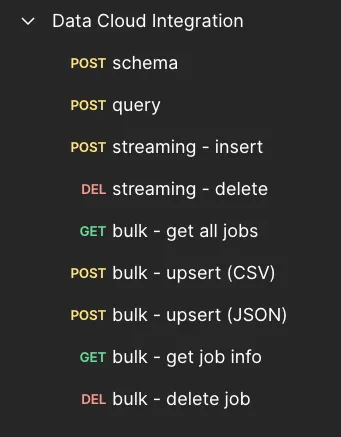
- Postman collection - If you have already imported the previous Postman collection, make sure you re-import the latest one (released on July 2024) from this link. This collection includes both the Streaming and the Bulk operations. Below is a screenshot of what the new collection looks like.
Understanding the Bulk process
Before jumping right away into the new operations, let’s take a moment to understand how Data Cloud processes this type of data. Take a look at the following diagram:
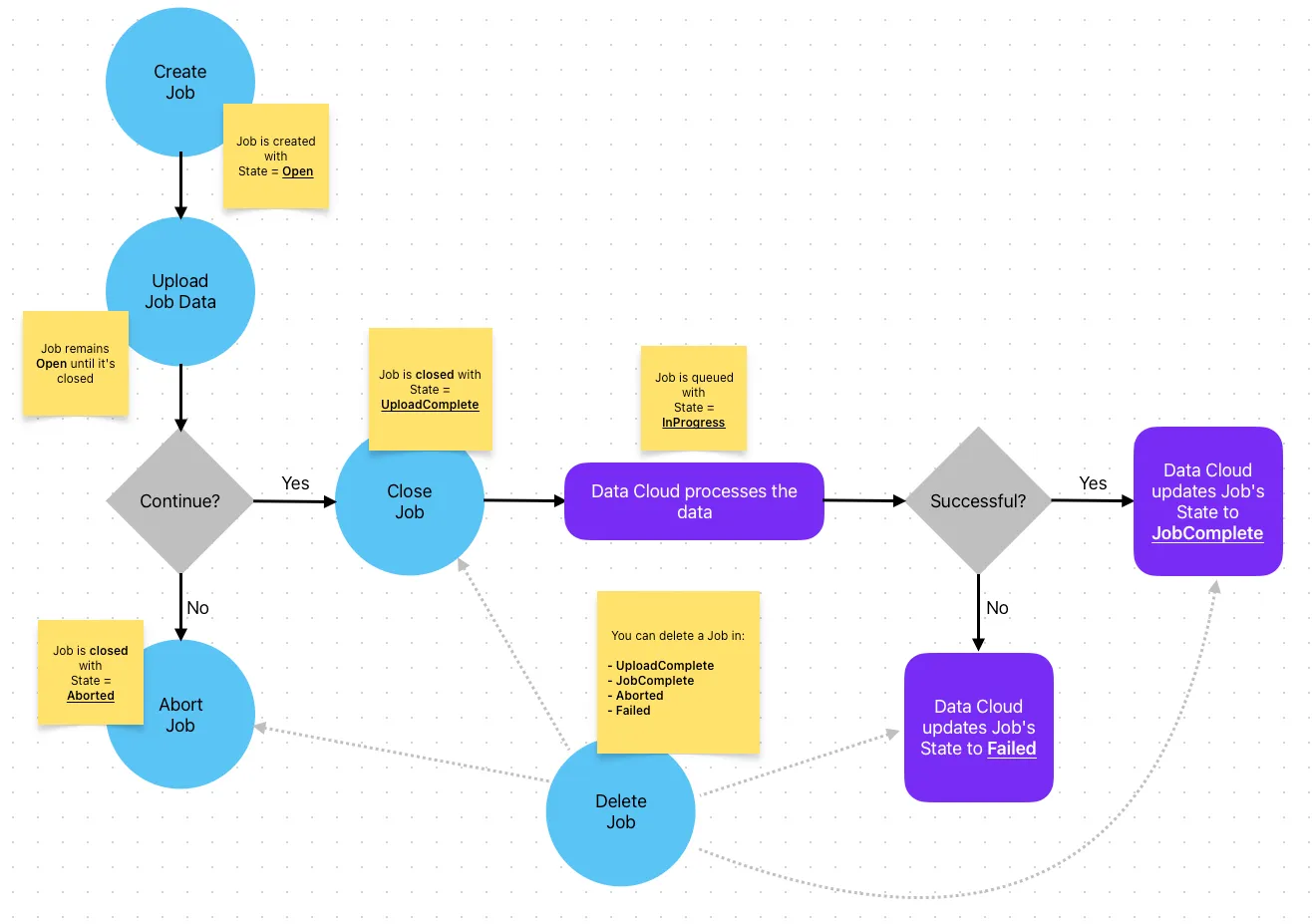
The blue circles are the actual operations you can do with the Data Cloud connector in MuleSoft and the purple squares are what Data Cloud changes on its own. A happy path processing would go like this:
- Create the Job
- Upload the data to the Job
- Close the Job with the UploadComplete status
- Data Cloud queues this data and changes the Job’s state to InProgress
- Once the data is processed, the Job’s status is changed to JobComplete
The Aborted state would happen if you wanted to stop the processing of the Job after it’s already been created. It is irrelevant if you already uploaded the data or not. Once you abort it, the data will be deleted from the Job.
The Failed state would happen if there was an error processing the Job in Data Cloud. For example, if the data you sent is corrupted, wrong, or incomplete.
You can always delete a Job at any point while the job is not being processed and is already closed. This means after you close it (Aborted/UploadComplete state) but before it is queued (not in the InProgress state), or after it has been processed (Failed/JobComplete).
If a specific object already contains an open/in progress Job, you won’t be able to create more Jobs for the same object and you will receive a 409-Conflict error when you try to create a new Job. In this case, you will need to wait until the Job is Failed/JobComplete, or you will have to abort the other Open Job first (if it hasn’t been closed).
A lot of this process is already taken care of by the Mule application in the JAR file. You only need to send your data to the upsert operation and the app will take care of creating, uploading, and closing the Job for you.
Get All Jobs
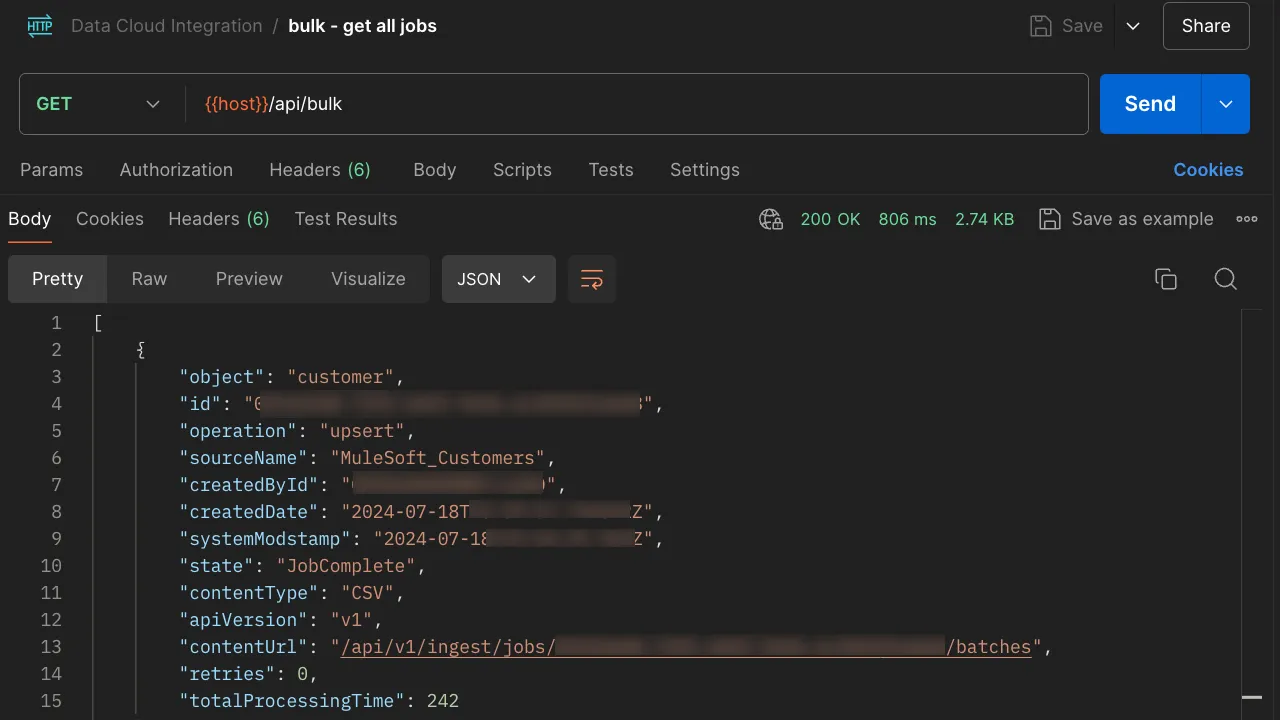
Once you import the Postman collection, you will see a request called “get all jobs”. This is a GET request calling the path /api/bulk of our Mule application.
You don’t need to add Query Params or a body. The credentials you set up in CloudHub are good enough to perform the call.
This request will return all the Jobs with their corresponding information, like the ID and its state.
*Note that the next screenshot has some blurred information for security reasons.
Upsert
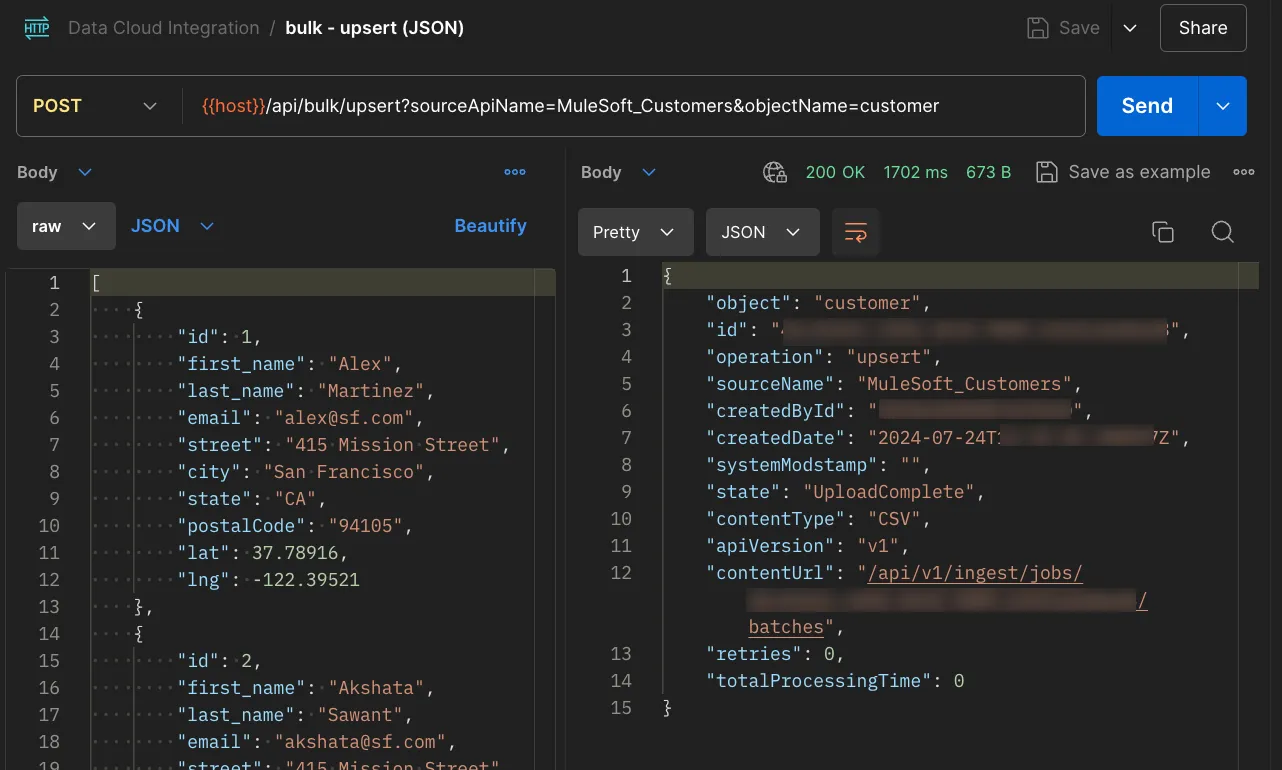
Once you import the Postman collection, you will see a request called “upsert (CSV)” and another one called “upsert (JSON)”. Both are the same request, calling a POST in /api/bulk/upsert, but you have the possibility to send different bodies on each. Internally, the Mule application is transforming the input body to a CSV that can be read by Data Cloud.
You need to add two Query Parameters, same as you did for the streaming insertion:
sourceApiNameobjectName
This request will create a new Job, upload the data, and close it with the UploadComplete status. If anything goes wrong while uploading the data, the Job will be aborted instead. Either way, you will receive a response with the details of the Job.
*Note that the next screenshot has some blurred information for security reasons.
Get Job
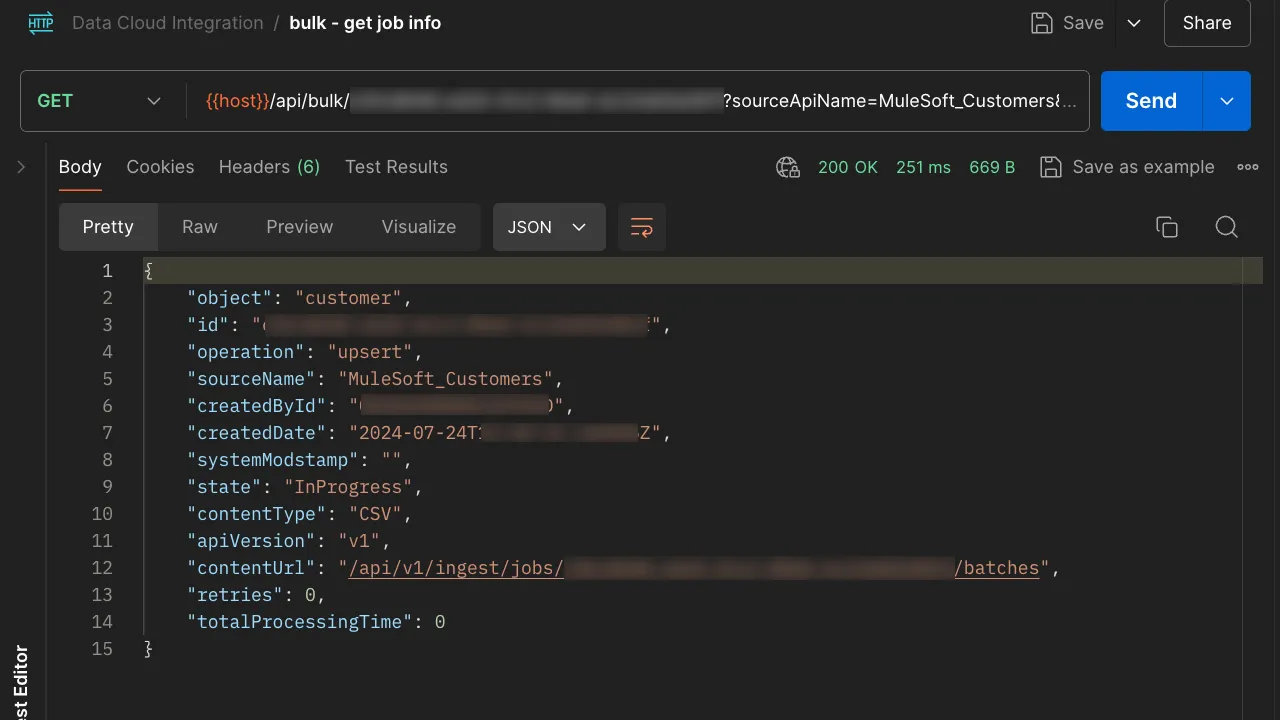
Once you import the Postman collection, you will see a request called “get job info”. This is a GET request calling the path /api/bulk/{id} of our Mule application.
You need to make sure to add your Job ID in the URI of the call and you need to add two Query Parameters, same as you did for the streaming insertion:
sourceApiNameobjectName
This request will return the given Job’s information (from the ID at the URI). You can use this to track its state.
*Note that the next screenshot has some blurred information for security reasons.
Delete Job
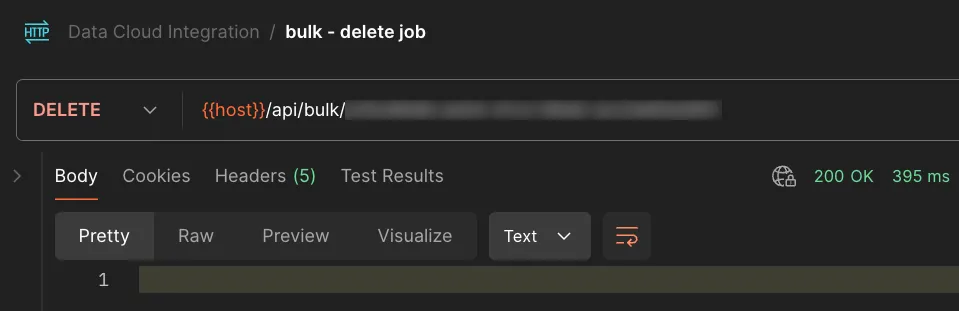
Once you import the Postman collection, you will see a request called “delete job”. This is a DELETE request calling the path /api/bulk/{id} of our Mule application.
You only need to make sure to add your Job ID in the URI of the call.
This request will delete the Job you pass in the URI. It will only be successful if the given Job is already closed. You can only delete a Job that has one of the following states:
- UploadComplete (before it’s InProgress, once it’s queued you can’t delete it)
- JobComplete
- Aborted
- Failed
If the Job is in a different state, it will try to Abort it first (this will only be successful if the Job is in an Open state).
*Note that the next screenshot has some blurred information for security reasons.
And that’s all for this post! I hope this helps to understand how to use the bulk operations with our Mule application.
Remember that you can always go to my GitHub repo if you want to take a look at the code :)
Subscribe to receive notifications as soon as new content is published ✨
💬 Prost! 🍻
FAQs
Frequently asked questions about this post.
-
What does the upsert operation do behind the scenes?
When you call the POST
/api/bulk/upsertrequest, the Mule application creates a new Job, uploads the data, and closes it with the *UploadComplete* status, transforming your input body into a CSV that Data Cloud can read. If anything goes wrong while uploading, the Job is aborted instead, and either way you receive a response with the details of the Job. -
What are the stages a bulk Job goes through?
In the happy path you first create the Job, then upload the data to it, then close it with the *UploadComplete* status; after that Data Cloud queues the data and changes the Job's state to *InProgress*, and once processing finishes the state becomes *JobComplete*. The blue circles in the diagram are operations you perform with the Data Cloud connector, while the purple squares are state changes Data Cloud makes on its own.
-
When can I delete a Job?
You can only delete a Job that is already closed and not being processed, meaning its state is UploadComplete (before it becomes InProgress), JobComplete, Aborted, or Failed. If the Job is in a different state, the delete request will try to Abort it first, which only succeeds if the Job is in an Open state.
-
Why do I get a 409-Conflict error when creating a Job?
If a specific object already contains an open or in-progress Job, you can't create more Jobs for the same object and you receive a 409-Conflict error. You need to wait until that Job is Failed or JobComplete, or abort the other Open Job first if it hasn't been closed.
-
Which query parameters do the bulk requests need?
The upsert request and the get job info request both need two query parameters, same as the streaming insertion:
sourceApiNameandobjectName. The get all jobs request needs no query params or body, and the delete job request only needs the Job ID in the URI.
More from this series
Data Cloud + MuleSoft Integration· Part 5 of 5
- 1.Part 1: Data Cloud + MuleSoft integration - Connected App, Ingestion API & Data Stream settings in Salesforce
- 2.Part 2: Data Cloud + MuleSoft integration - Deploy your own Mule app on Anypoint Platform (CloudHub)
- 3.Part 3: Data Cloud + MuleSoft integration - Call your integration with Postman
- 4.Part 4: Data Cloud + MuleSoft integration - Secure your API with basic authentication in API Manager
- 5.Part 5: Data Cloud + MuleSoft integration - Insert data with the BULK operations