
How to Invert a Binary Tree with DataWeave
The DataWeave Language is a simple, powerful tool used to query and transform data inside of Mule. You can also use it to solve an algorithmic problem. Invert a Binary Tree is a popular Coding Question to test your coding skills. Let's try to solve this with DataWeave.

The DataWeave language is a simple, powerful tool used to query and transform data inside of Mule.
But you can also use it to solve algorithmic problems.
How to invert a Binary Tree is a popular coding question to test your skills.
Let’s try to solve this with DataWeave.
Definition
Ok, but what is a binary tree? Yes, sure!
Firstly we define a tree as a set of elements (nodes), with the following properties:
- Each node can be connected to many children
- Each node has one parent, except the root node that has no parent
A binary tree is a tree where each node has at most 2 children: “left” and “right”.
We can define the DataWeave binary tree structure in the following way:
type Tree= {
    value: String,
    right?: Tree,
    left?: Tree
}
Problem
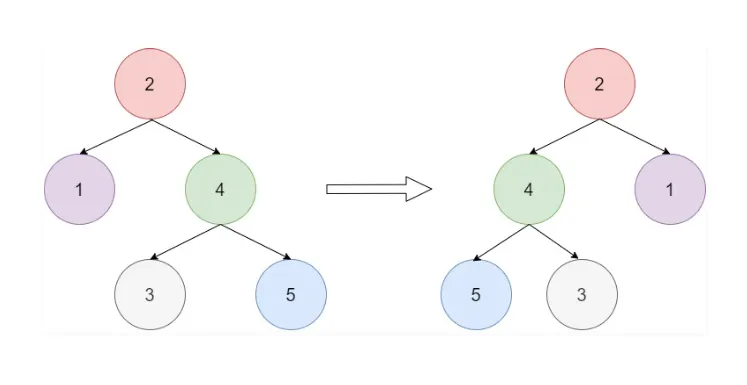
In order to invert a binary tree, we need to swap left and right for every level of the tree, as you can see in the following example:
Solution
It’s easier than it looks. Thanks to Mr. Recursion!
We can solve the problem for the first children by swapping them and then recursively applying the same solution for the left and right sub-tree.
Input
{
    "value": "2",

     "left":
    {
        "value": "1"
    },

    "right":
    {
        "value": "4",
        "left":
        {
            "value": "3"
        },
        "right":
        {
            "value": "5"
        }

    }

}
DataWeave Solution
%dw 2.0
output application/json

type Tree= {
    value: String,

    left?: Tree,
    right?: Tree
}

fun invertTree(node ) : Tree =

    {
         value:   node.value ,

       ( left: invertTree(node.right )) if (node.right?),
       ( right:   invertTree(node.left )) if (node.left?)
    }
---
invertTree(payload)
Output
{
  "value": "2",
  "left": {
    "value": "4",
    "left": {
      "value": "5"
    },
    "right": {
      "value": "3"
    }
  },
  "right": {
    "value": "1"
  }
}
Note
This solution is using regular recursive functions. If the recursion level exceeds 255 iterations, you will receive a Stack Overflow error. To avoid this, you can also use tail-recursive functions. To learn more about this, see this article.
Conclusion
Now we know how to use Mr. Recursion in DataWeave in order to solve the invert binary tree problem.
Thanks for reading my post and I hope it will help understand this wonderful language.
That’s it for now! See you in the next post!
-Stefano
FAQs
Frequently asked questions about this post.
-
What is a binary tree in this post?
The post defines a tree as a set of nodes where each node can be connected to many children and each node has one parent except the root node, which has no parent. A binary tree is then a tree where each node has at most two children, called "left" and "right".
-
How do I model a binary tree as a type in DataWeave?
The post defines a
Treetype with avalueof typeStringand two optional children,left?andright?, each itself aTree, so the optional fields let a node have a left child, a right child, both, or neither. -
How does the DataWeave solution invert the tree?
It uses recursion: for each node it keeps the same
value, then sets the newlefttoinvertTree(node.right)only ifnode.right?exists and the newrighttoinvertTree(node.left)only ifnode.left?exists, swapping the children at the first level and recursively applying the same solution to the left and right sub-trees. -
Why might I get a Stack Overflow error, and how do I avoid it?
The post notes that the solution uses regular recursive functions, so if the recursion level exceeds 255 iterations you will receive a Stack Overflow error; to avoid this you can use tail-recursive functions instead, as described in the linked MuleSoft article at https://blogs.mulesoft.com/dev-guides/how-to-tutorials/untie-multilevel-structures-dataweave-recursive-calls/ .