
DataWeave scripts to clean your XML/HTML code snippets for a WordPress blog post
Learn how to clean an XML or HTML code snippet to publish in a WordPress article with these DataWeave scripts.
In case you’re not familiar with my dataweave-scripts GitHub repo, it’s the place where I keep some of the scripts I’ve created to help the community with transformation questions or simply some scripts that have been handy to me.
In this post, I want to introduce you to two transformations I added because of a use case I came up with last week. Basically to help clean an XML or HTML to publish a script in a WordPress article.
The problem
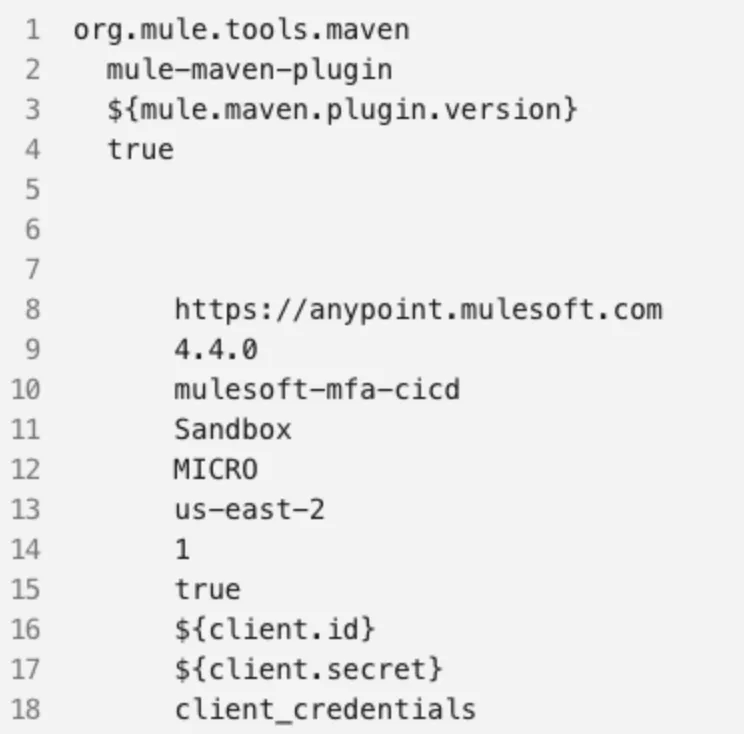
This problem started because I had written a blog post in a WordPress-based blog. I was sharing a Maven snippet (XML format). The issue is that WordPress mistook the XML tags as HTML code. So, instead of having a regular XML snippet, the article was showing something like this:
The fix was simple. Instead of having the regular < and > characters pasted in the code snippet, I had to use < and > respectively.
(Thanks so much Julian Duque for providing the fix! I had no idea about this issue in WordPress 🤗*)*
For example, instead of writing <plugin>, I had to replace it with <plugin>
I thought to myself: If I need to keep doing this for future blog posts, maybe I can create a DataWeave transformation to fix this for me so I can just easily copy and paste the new clean snippet.
These are the two approaches I came up with.
First approach: XML input
The first thing I tried to do since I was using an XML format for the script, was to take an input XML format, transform it to a String, and then clean the text. This is the script I came up with:
%dw 2.0
output text/plain
---
write(payload,"application/xml")
replace "<?xml version='1.0' encoding='UTF-8'?>\n" with ""
replace "<" with "<"
replace ">" with ">"However, I quickly ran into issues when I tried to clean an HTML code snippet using this same transformation. This is how I came up with the second approach.
Second approach: plain text input
This time I decided to use a plain text input instead of an XML input format. This way, both XML and HTML code snippets could be used as the input and I wouldn’t need to use the write() function in the first place.
%dw 2.0
output text/plain
---
payload
replace "<" with "<"
replace ">" with ">"Plus, I got rid of one replace() because I no longer needed to remove the XML header.
It’s a short post, but I hope it’s insightful for you all 🤗 I’m sure I’ll keep using this example in the Playground to modify my WordPress posts in the future.
Let me know if you’ve faced similar issues with WordPress before!
FAQs
Frequently asked questions about this post.
-
Why does WordPress break my XML code snippets?
WordPress mistakes the XML tags for HTML code, so instead of showing a regular XML snippet the article strips the tags out and leaves only the bare values, as shown in the Maven snippet example in the post.
-
How do I fix XML tags being stripped in a WordPress post?
Instead of pasting the regular
<and>characters in the code snippet, replace them with<and>respectively, so for example<plugin>becomes<plugin>. -
How do I clean an XML snippet with DataWeave?
The first approach takes an XML input, uses
write(payload,"application/xml")to turn it into a String, then chainsreplaceto strip the<?xml version='1.0' encoding='UTF-8'?>header and swap<for<and>for>. -
What's the difference between the two DataWeave approaches in this post?
The first approach uses an XML input format and the
write()function, while the second uses a plain text input so both XML and HTML snippets work, drops thewrite()call, and removes onereplacesince the XML header no longer needs to be stripped. -
Where can I find these DataWeave scripts?
They live in the author's dataweave-scripts GitHub repo at https://github.com/alexandramartinez/dataweave-scripts , and each approach has an Open in the Playground link in the post.