
Anypoint Studio 7.11.0: New features overview
Are you already using the newest version of Anypoint Studio? Let me guide you through the coolest features it has. Studio includes 3 new features that you will enjoy: Support for Mule Runtime 4.4, DataWeave 2.4, and the new "Referenced by" function.

Are you already using the newest version of Anypoint Studio? If the answer is yes, let me guide you through the coolest features it has. If the answer is no, go ahead and download it here to start playing with it!
New features
Anypoint Studio includes three new features that you will enjoy as a MuleSoft Developer:
- Support for Mule Runtime 4.4.
- Correlation ID Management.
- Improved Logging Capabilities.
- DataWeave Updates (DataWeave 2.4 features!).
- Mule Tracing Module.
- Feature Flags.
- DataWeave 2.4. Including language improvements and new modules.
- Read larger-than-memory strings automatically.
- New modules, functions, types, annotations, and variables.
- Helper functions for handling null values.
- “Referenced by” function. Now you can see a list of all flow references to a particular flow/subflow and you also can jump there with a few clicks.
If you are interested in learning more about Mule 4.4 new features, you will find all the details here. Also, if you are an amazing DataWeave programmer, it’s a good idea to take a look at the docs.
As soon as you start your Anypoint Studio installation, you will see the following:
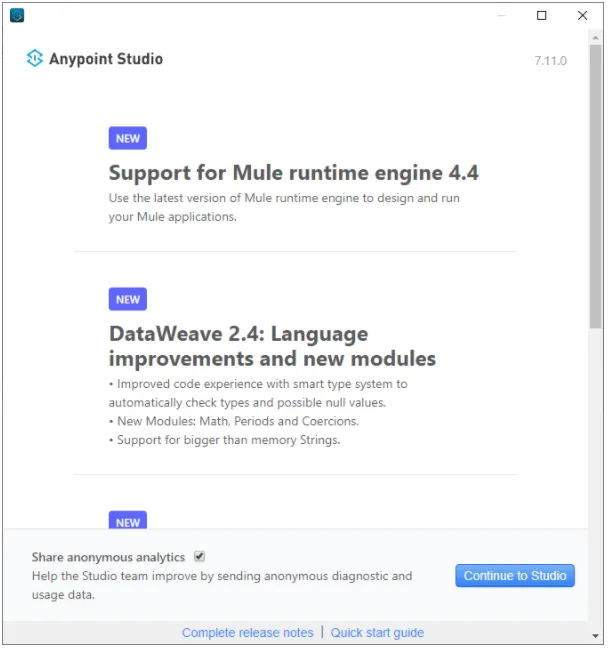
Support for Mule 4.4
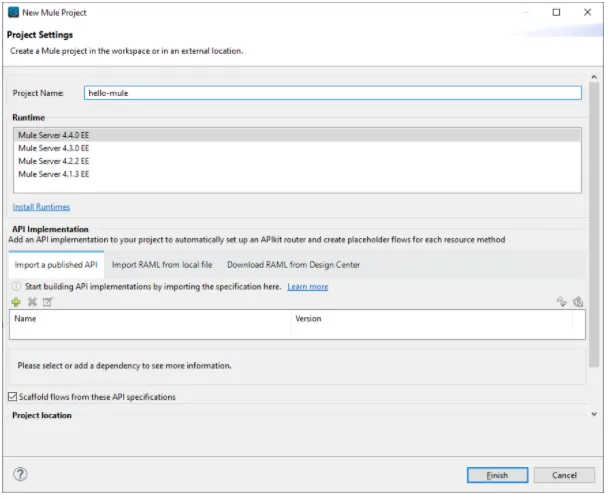
In this new version of Studio, you will have available the newest version of the Mule Runtime (4.4). When you create a new project just select Mule Server 4.4.0 EE and start enjoying the new features:
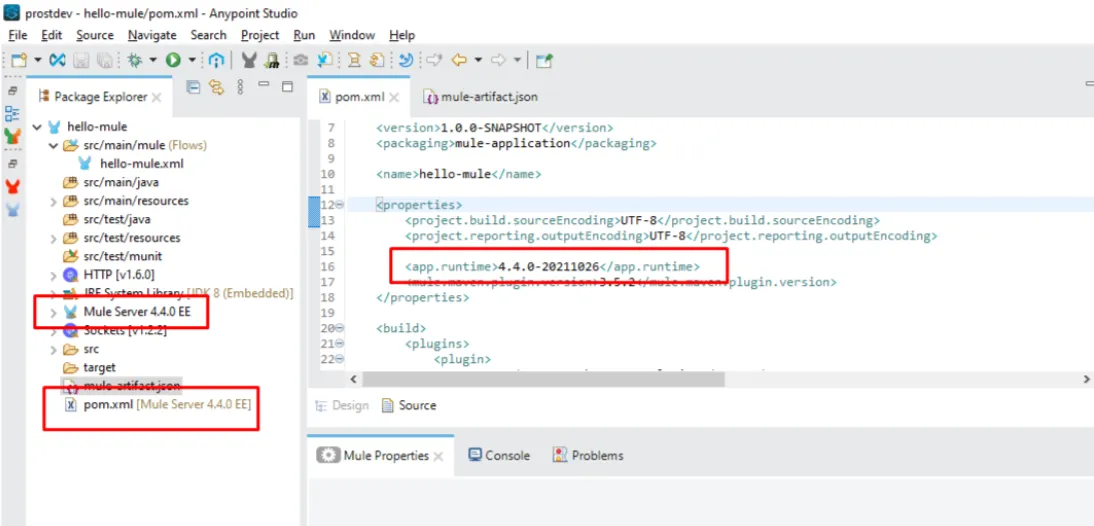
As you can notice you are using the Mule 4.4 version. You will find it everywhere in your project (pom.xml file, dependencies, and so on).
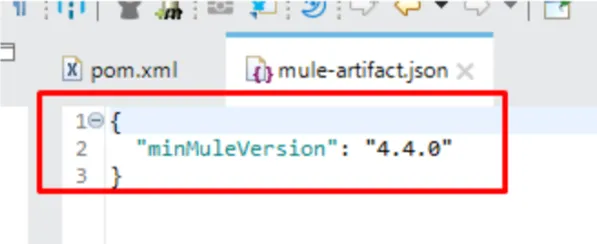
You will also find this version within the mule-artifact.json file:
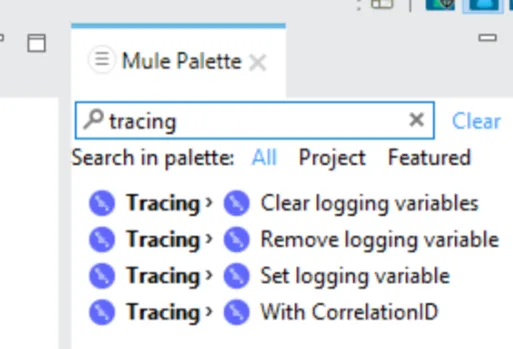
The new Tracing Module is already in the Mule Palette:
DataWeave 2.4
There are various new DataWeave features, modules, and functions. Let’s try some of them.
onNull function
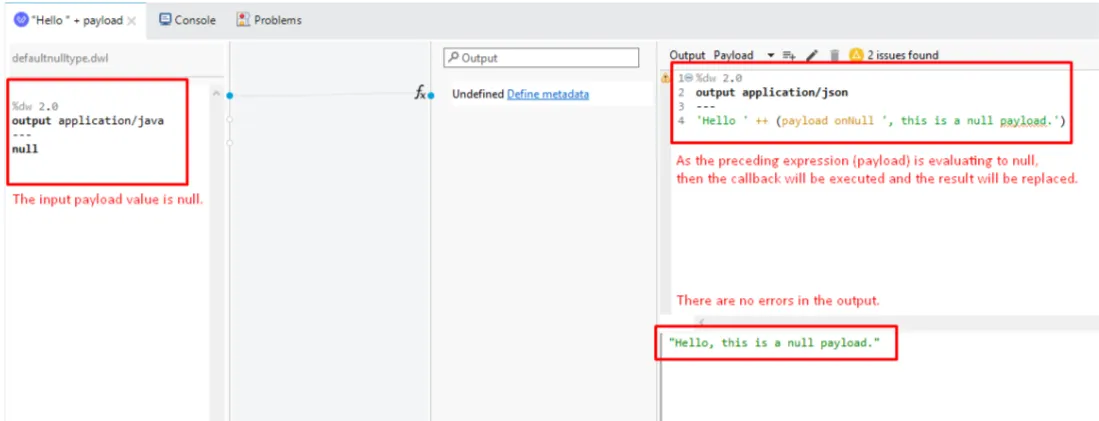
The onNull function executes a callback function if the preceding expression returns a null value and then replaces the null value with the result of the callback.
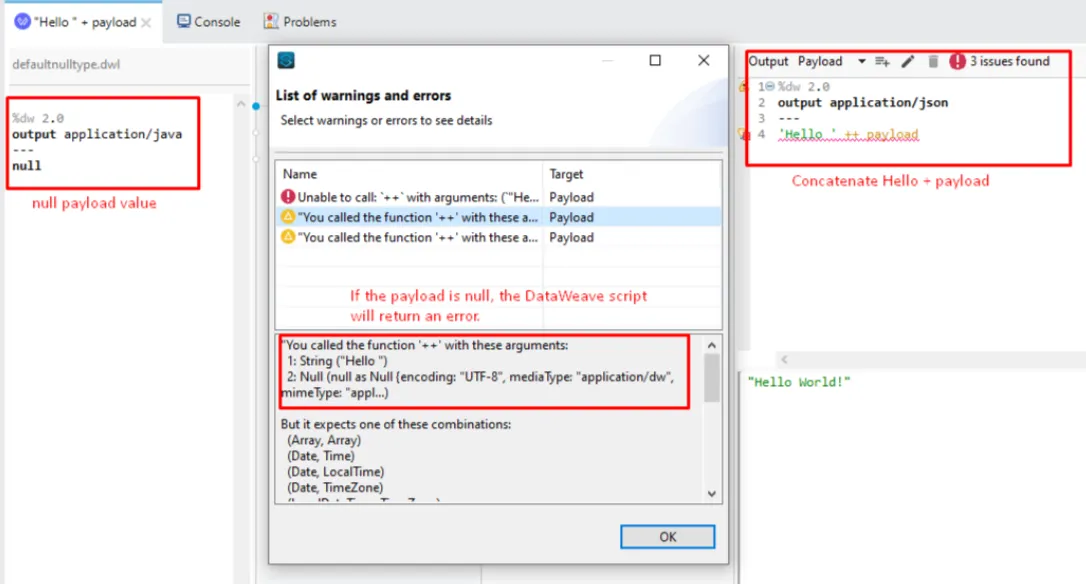
In the following DataWeave script, we are concatenating ‘Hello’ with the content of the payload. But, what happens if the payload has a null value? We’ll receive an error like this:
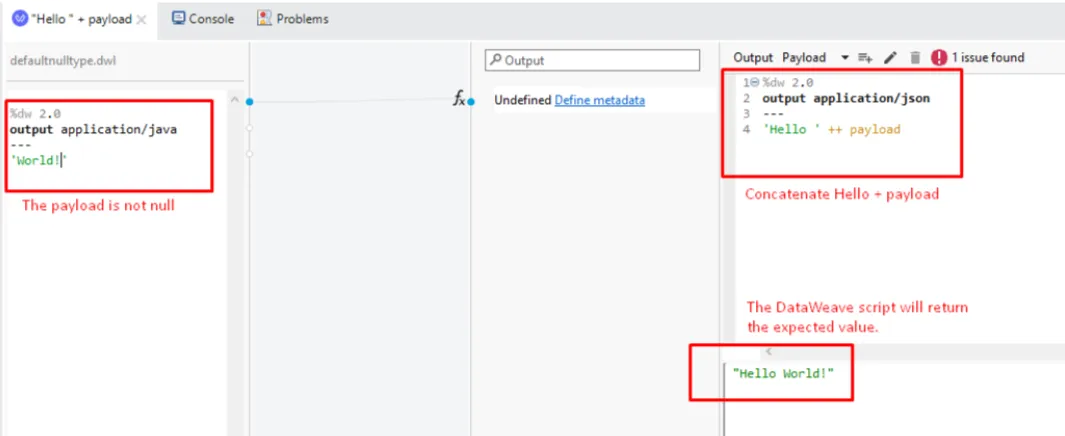
If we fix the input payload value, then the DataWeave script will return the expected (concatenated) value:
How can we avoid this type of error using DataWeave and particularly the onNull function?
hammingDistance function
Let’s try another new function that caught my attention: hammingDistance. According to Wikipedia, in information theory, the Hamming distance between two strings of equal length is the number of positions at which the corresponding symbols are different. Let me explain this with an example:
We have two strings:
- String 1 = 11011001
- String 2 = 10011101
Both strings have eight characters of length and they are different only at positions 2 and 5. So they have two positions at which their characters are different, then the result of the hamming distance should be 2.
We can confirm this using the DataWeave function. Notice that the hamming distance function is within the Strings module, so it must be imported explicitly in your DataWeave script.
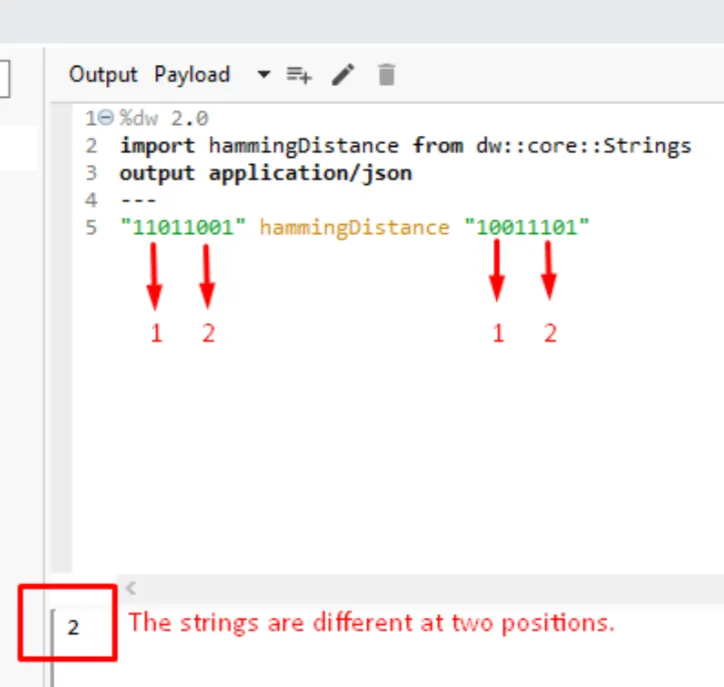
Those are only two of the new functions that were included in DataWeave 2.4. Please explore the docs and enjoy all the new features, modules, and functions.
“Referenced by” function
Finally, let’s review this new feature called “referenced by”. This could be useful when you have multiple configuration files within a complex Mule application and you want to jump to the flows that are referencing a particular flow or subflow.
The only thing you need to do is right-click on the flow (or subflow) you are currently working on and then select the “Referenced by” option (Ctrl+Shift+G).
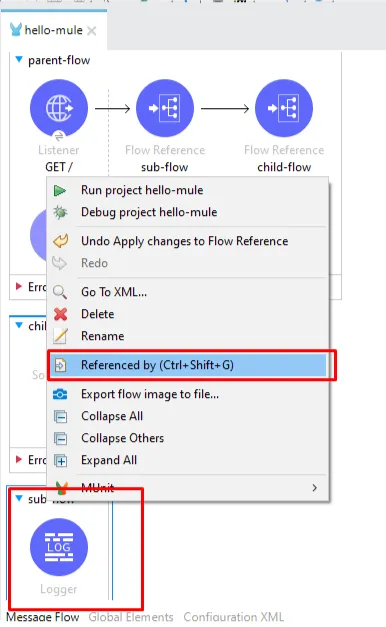
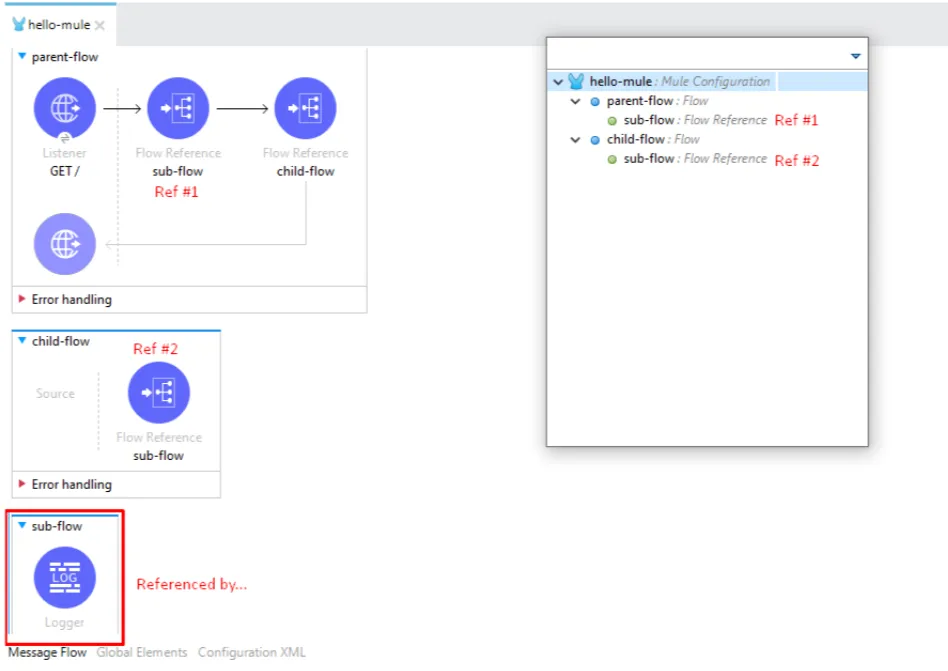
The result will be a list of flows that are referencing that particular flow and then you can jump to any of them.
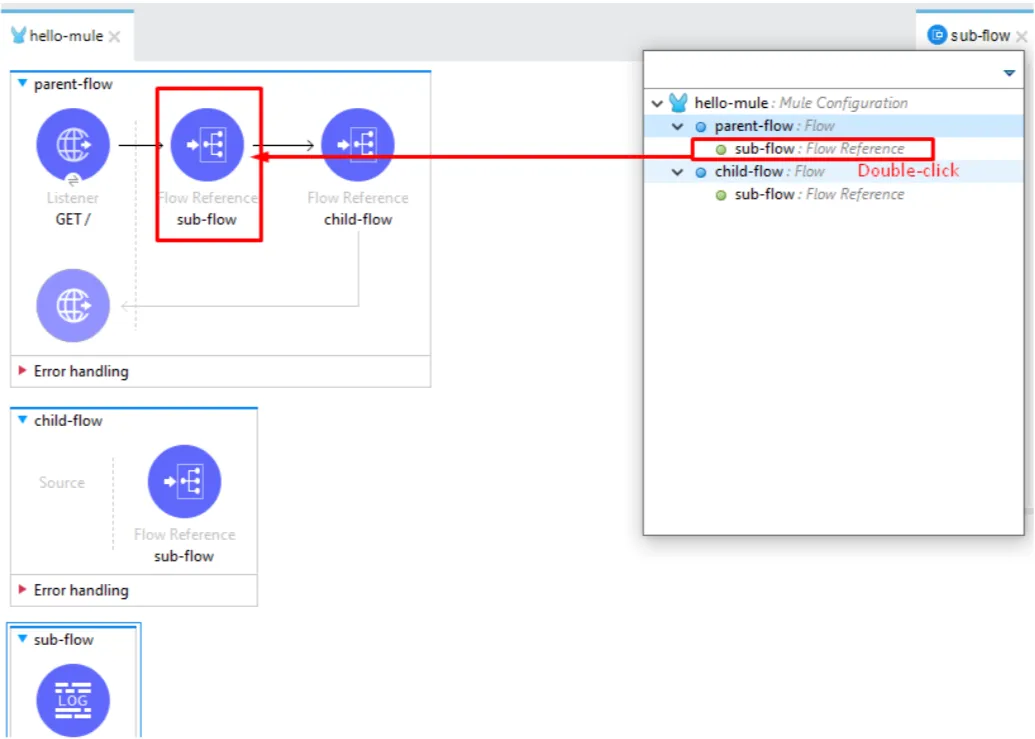
When you double-click over the reference, automatically you will be positioned on that particular flow reference:
It is cool, isn’t it?
Now you have explored the newest version of Anypoint Studio, please let us know what do you think? What are the new things you found on it? And… happy coding!
FAQs
Frequently asked questions about this post.
-
What are the new features in Anypoint Studio 7.11.0?
This version of Anypoint Studio includes three new features for MuleSoft developers: support for Mule Runtime 4.4, DataWeave 2.4 with language improvements and new modules, and the new "Referenced by" function that lists all flow references to a particular flow or subflow.
-
How do I use Mule Runtime 4.4 in a new project?
When you create a new project in Studio 7.11.0, just select Mule Server 4.4.0 EE from the runtime list and you will start using the new features. You will then find the 4.4 version everywhere in your project, including the
pom.xmlfile and dependencies, and as theminMuleVersionset to "4.4.0" in themule-artifact.jsonfile. -
What does the DataWeave onNull function do?
The onNull function executes a callback function if the preceding expression returns a null value, and then replaces the null value with the result of that callback. The post shows it used to avoid an error when concatenating "Hello" with a null payload.
-
How does the hammingDistance function work in DataWeave 2.4?
The hammingDistance function returns the number of positions at which two strings of equal length have different characters, so comparing the 8-bit strings 11011001 and 10011101 returns 2 because they differ only at positions 2 and 5. It lives in the Strings module, so it must be imported explicitly in your DataWeave script.
-
What is the "Referenced by" function used for?
The "Referenced by" function is useful when you have multiple configuration files in a complex Mule application and want to jump to the flows referencing a particular flow or subflow. You right-click the flow or subflow and select the "Referenced by" option (Ctrl+Shift+G), then double-click any reference in the resulting list to be positioned on that flow reference.