
Amazon DynamoDB Connector Operations in Mule 4 (Part 1)
This blog post provides quick examples of how to use the Amazon DynamoDB Connector in Mule 4 using Anypoint Studio. Operations: create table, describe table, list tables, put item, batch put item (single and multiple tables), get item, batch get item, update item, query, scan, delete item, batch delete item.

This blog post provides quick examples of how to use the Amazon DynamoDB Connector in Mule 4 using Anypoint Studio. There is a lot of documentation available on this connector’s usage, but none could be found that specifically shows how to structure the JSON requests, which are required for all DynamoDB connector operations.
This article explains all the connector operations along with their JSON requests, with simple use case scenarios.
We have considered all available DynamoDB data types for this use case, so you will have a very good understanding and usage of different DynamoDB data types.
Operations
Below is the list of connector operations considered for the first part of this series.
- Create Table
- Describe Table
- List Tables
- Put Item
- Batch Put Item - Single Table
- Batch Put Item - Multiple Tables
- Get Item
- Batch Get Item - Single Table
- Batch Get Item - Multiple Tables
- Update Item
- Query
- Scan
- Delete Item
- Batch Delete Item - Single Table
- Batch Delete Item - Multiple Tables
Use Case
To better understand the DynamoDB operations, we have considered a use case of the continents & their countries. All this data is segregated based on types of information & stored into two DynamoDB tables.
Each continent consists of multiple countries, & each country will have its own specific information like unique id, available city name, specialties, available zip codes, year-wise populations, etc. All this information is stored in the table CONTINENT-COUNTRY-INFO-TABLE.
Along with the above information, countries also have some classified information, like available agents in-country and intelligence agency information. All this classified information is stored in the table COUNTRY-CLASIFIED-INFO-TABLE.
This use case has taken into consideration (almost) all available DynamoDB connector operations and their data types for clear understanding.
CONTINENT-COUNTRY-INFO-TABLE
| Column Name | Data Type | Attributes |
|---|---|---|
| continent_name | String | primary-partition-key |
| country_unique_id | Number | primary-sort-key |
| country_name | String | |
| isActive | Boolean | |
| country_specialities | StringSet | |
| country_available_pincodes | NumberSet | |
| country_yearwise_population | Map | |
| country_city_name | List | |
| country_geo_value | null |
COUNTRY-CLASIFIED-INFO-TABLE
| Column Name | Data Type | Attributes |
|---|---|---|
| country_unique_id | Number | primary-partition-key |
| country_agents | Number | |
| country_intelligence_agency | String |
1. Create Table
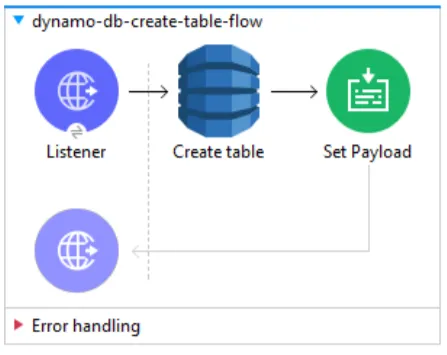
Let’s start with our first operation. This operation will create a new table with the provided configurations.
Note
Execute this connector operation separately for both tables, with their own configurations.
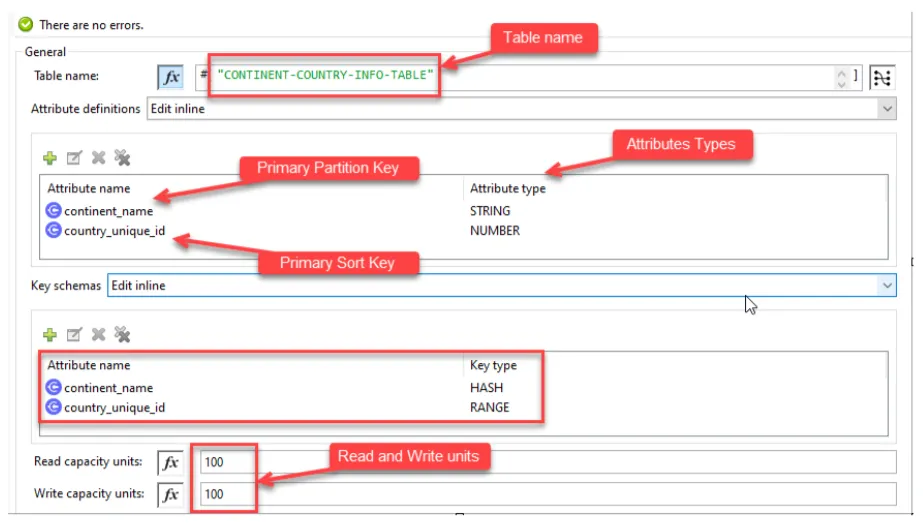
Below are the provided parameters:
- Table name: The name for the table.
- AttributeDefinitions: This value is an array of attributes that describe the key schema for the table and indexes.
We have configured a composite primary key, which is a combination of primary key and sort key.
continent_name: Primary Partition Keycountry_unique_id: Primary Sort key
A composite primary key gives you additional flexibility when querying data. For example, if you provide only the value for continent_name, DynamoDB retrieves all of the country_unique_id associated with it.
- KeySchema: This value specifies the attributes that make up the primary key for a table or an index.
- Read Capacity Units: 100 – The maximum number of strongly consistent reads per second.
- Write Capacity Units: 100 – The maximum number of writes consumed per second.
Response
Once you execute this connector, the DynamoDB tables will be created and you will receive a SUCCESS Response.
2. Describe Table
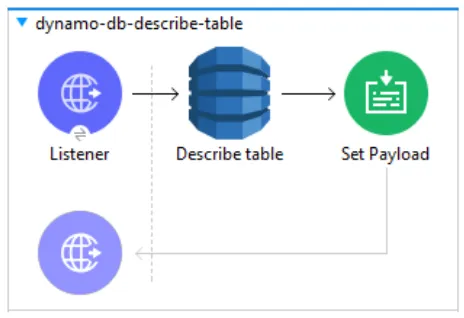
This operation is used to get information about the table, including the current status of the table, when it was created, the primary key schema, and any indexes on the table.
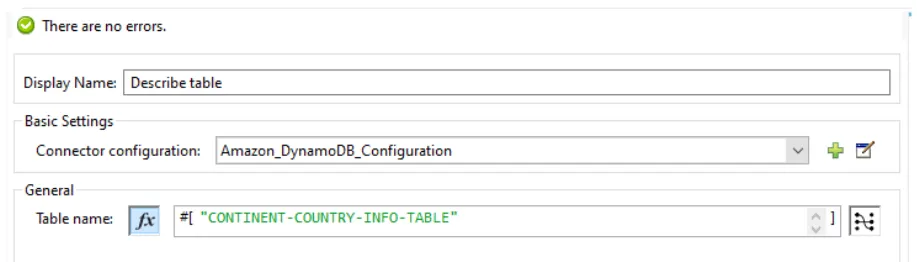
The only parameter we configure for this operation is the Table name.
Response
Once executed, the connector will return a response in the below format.
{
        "globalSecondaryIndexes": null,
        "latestStreamLabel": null,
        "latestStreamArn": null,
        "keySchema": [
            {
                "attributeName": "continent_name",
                "keyType": "HASH"
            },
            {
                "attributeName": "country_unique_id",
                "keyType": "RANGE"
            }
        ],
        "provisionedThroughput": {
            "writeCapacityUnits": 100,
            "readCapacityUnits": 100,
            "numberOfDecreasesToday": 0,
            "lastIncreaseDateTime": null,
            "lastDecreaseDateTime": null
        },
        "tableStatus": "ACTIVE",
        "itemCount": 0,
        "tableArn": "arn:aws:dynamodb:xx-xxxx-x:xxxxxxxxxxxxxxxxx:table/CONTINENT-COUNTRY-INFO-TABLE",
        "tableSizeBytes": 0,
        "tableName": "CONTINENT-COUNTRY-INFO-TABLE",
        "streamSpecification": null,
        "attributeDefinitions": [
            {
                "attributeType": "STRING",
                "attributeName": "continent_name"
            },
            {
                "attributeType": "NUMBER",
                "attributeName": "country_unique_id"
            }
        ],
        "localSecondaryIndexes": null,
        "creationDateTime": "2022-03-07T11:13:56.413"
    }
3. List Tables
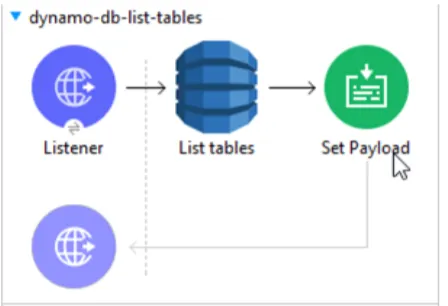
This operation will return all the table names associated with your current AWS account and endpoint.
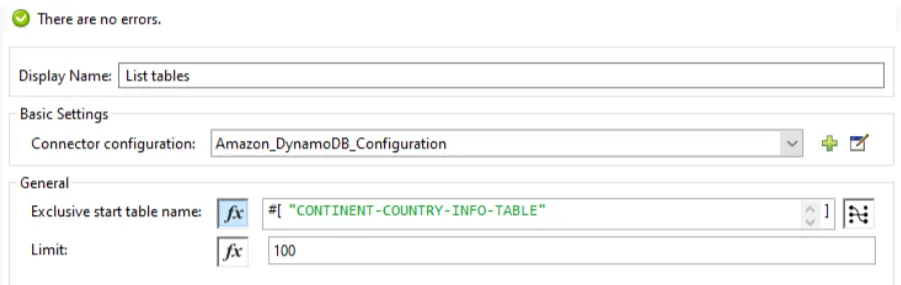
Below parameters are configured for this operation:
- Exclusive start table name: The first table name that this operation will evaluate. If no table names are provided, it will list all tables.
- Limit: A maximum number of table names to return. If this parameter is not specified, the limit is 100.
Response
Once executed, the connector will return a response in the below format.
{
“tableNames” : [
	“table-1”,
	“table-2”,
	“table-3”
],
“lastEvaluatedTableName” : “table-4”
}
4. Put Item
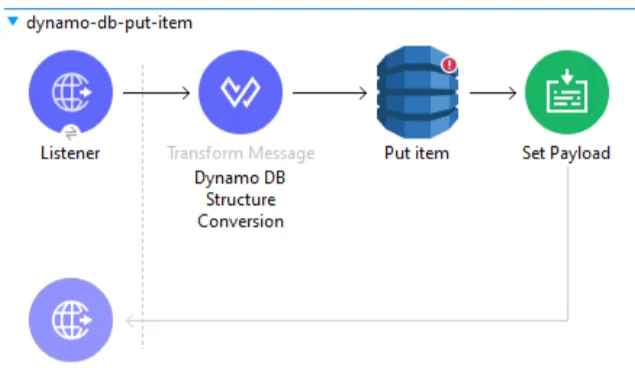
Use this operation when the need is to create a new item or replace an existing item in the DB. If an item that has the same primary key as a new item already exists in a specified table, the new item replaces an existing item.
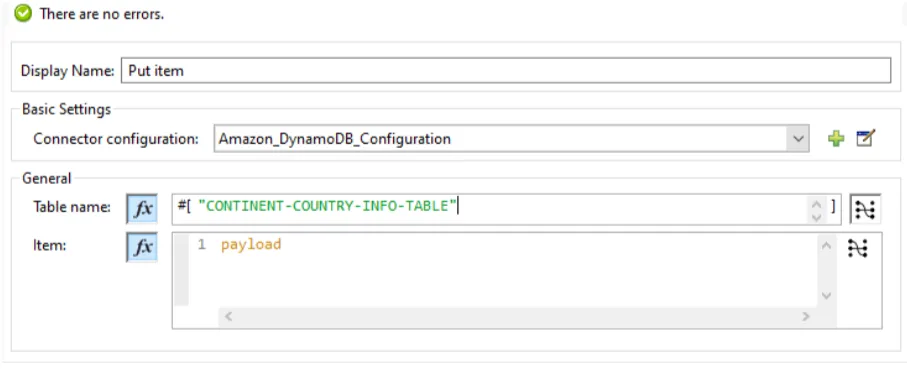
Request
Let’s now create our first country “India” with other required information.
%dw 2.0
output application/json
---
{
	"continent_name": {
		"S": "ASIA"
	},
	"country_unique_id": {
		"N": 1
	},
	"country_name": {
		"S": "India"
	},
	"isActive": {
		"Bool": true
	},
	"country_specialities": {
		"ss": ["India is democratic country",
      	"India has 121 languages and 270 mother tongues",
      	"Jana-gana-mana is a national song of india"]
	},
	"country_available_pincodes": {
		"ns": [110001,
      110002,
      110003]
	},
	"country_yearwise_population": {
    "M": {
      "2020": {
        "N": "1380004385"
      },
      "2021": {
        "N": "1393409038"
      },
	  "2022": {
        "N": "1406631776"
      }
    }
  },
	"country_city_name": {
		"L": [
		{
			"S": "Mumbai"
		},
		{
			"S": "Delhi"
		},
		{
			"S": "Pune"
		},
		{
			"S": "Kolkata"
		}
	]
	}
}
Response
Once you execute the above flow, you will see 1 record is created in the table CONTINENT-COUNTRY-INFO-TABLE.
5. Batch Put Item - Single Table
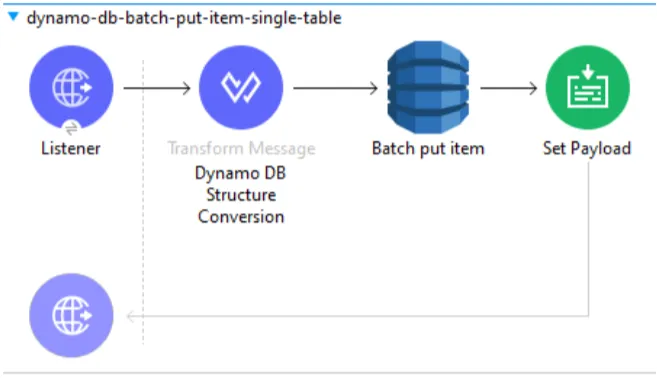
This operation inserts/puts multiple records or items in one table.
Request
Let’s now create 2 country records “Singapore” and “Japan” in the same table CONTINENT-COUNTRY-INFO-TABLE.
{
   	"CONTINENT-COUNTRY-INFO-TABLE": [{	//Table1
          	"PutRequest": {                             	// Item 1
                 	"continent_name": {
                        	"S": "ASIA"
                 	} as Object {
                        	class:"org.mule.extension.dynamodb.api.model.AttributeValue"
                 	},
                 	"country_unique_id": {
                        	"N": 2
                 	} as Object {
                        	class:"org.mule.extension.dynamodb.api.model.AttributeValue"
                 	},
                 	"country_name": {
                        	"S": "Singapore"
                 	} as Object {
                        	class:"org.mule.extension.dynamodb.api.model.AttributeValue"
                 	},
                 	"isActive": {
                        	"Bool": true
                 	} as Object {
                        	class:"org.mule.extension.dynamodb.api.model.AttributeValue"
                 	},
                 	"country_specialities": {
					"ss": [
							"Singapore is Renowned for having some of the cleanest streets in the world",
							"Singapore has a Reputation as the Garden City",
							"Singapore has Good Street Food"]
			} as Object {
                        	class:"org.mule.extension.dynamodb.api.model.AttributeValue"
                 	},
                 	"country_available_pincodes": {
                        	"ns": [1,2,3]
                 	} as Object {
                        	class:"org.mule.extension.dynamodb.api.model.AttributeValue"
                 	},
                 	"country_yearwise_population": {
							"M": {
					"2020": {
						"N": 5850342
					},
					"2021": {
						"N": 5896686
					},
					"2022": {
						"N": 5943546
					}
				}}
			 as Object {
                        	class:"org.mule.extension.dynamodb.api.model.AttributeValue"
                 	},
                 	"country_city_name": {
				"L": [{
					"S": "Central Region"
				},
		{
					"S": "East Region"
				},
		{
					"S": "North Region"
				},
		{
					"S": "North-East Region"
				},
		{
					"S": "West Region"
				}]
			} as Object {
                        	class:"org.mule.extension.dynamodb.api.model.AttributeValue"
                 	}
          	}
   	}  as Object {
          	class:"org.mule.extension.dynamodb.api.model.WriteRequest"
   	},
     		{
      	"PutRequest": {                         	// Item 2
                 	"continent_name": {
                        	"S": "ASIA"
                 	} as Object {
                        	class:"org.mule.extension.dynamodb.api.model.AttributeValue"
                 	},
                 	"country_unique_id": {
                        	"N": 3
                 	} as Object {
                        	class:"org.mule.extension.dynamodb.api.model.AttributeValue"
                 	},
                 	"country_name": {
                        	"S": "Japan"
                 	} as Object {
                        	class:"org.mule.extension.dynamodb.api.model.AttributeValue"
                 	},
                 	"isActive": {
                        	"Bool": true
                 	} as Object {
                        	class:"org.mule.extension.dynamodb.api.model.AttributeValue"
                 	},
                 	"country_specialities": {
				"ss": [	"Mount Fuji is the highest volcano in Japan",
						"Tokyo Skytree is the Tallest tower not just in Japan, but in the entire world",
						"Japan has the Fastest bullet train",
						"Geisha are a big part of Japanese tradition and culture"]
			} as Object {
                        	class:"org.mule.extension.dynamodb.api.model.AttributeValue"
                 	},
                 	"country_available_pincodes": {
                        	"ns": [1200000,1900100,1120000]
                 	} as Object {
                        	class:"org.mule.extension.dynamodb.api.model.AttributeValue"
                 	},
                 	"country_yearwise_population": {
				"M": {
					"2020": {
						"N": 126476461
					},
					"2021": {
						"N": 126050804
					},
					"2022": {
						"N": 125584838
					}
				}
			} as Object {
                        	class:"org.mule.extension.dynamodb.api.model.AttributeValue"
                 	},
                 	"country_city_name": {
						"L": [{
							"S": "Tokyo"
						},
				{
							"S": "Osaka"
						},
				{
							"S": "Kawasaki"
						},
				{
							"S": "Chiba"
						}]
					} as Object {
                        	class:"org.mule.extension.dynamodb.api.model.AttributeValue"
                 	}
          	}
   	}  as Object {
          	class:"org.mule.extension.dynamodb.api.model.WriteRequest"
   	}]
}
Response
Once you execute the above flow, you will see both these records are created in table CONTINENT-COUNTRY-INFO-TABLE.
6. Batch Put Item - Multiple Tables
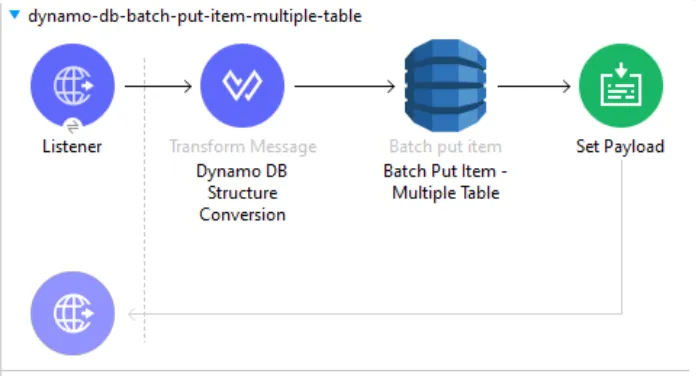
This operation Inserts/Puts multiple records or items in one or more tables.
![Batch put item config with Request put items set to the Expression #[payload].](/_astro/amazon-dynamodb-connector-operations-in-mule-4-part-1-11.DD1iCaX3_ZIrmMN.webp)
Request
Let’s now create one more country “Switzerland” in table CONTINENT-COUNTRY-INFO-TABLE and all 4 countries classified information (India, Singapore, Japan, Switzerland) in table COUNTRY-CLASIFIED-INFO-TABLE.
{
   	"CONTINENT-COUNTRY-INFO-TABLE": [{	//Table1
          	"PutRequest": {                             	// Item 1
                 	"continent_name": {
                        	"S": "Europe"
                 	} as Object {
                        	class:"org.mule.extension.dynamodb.api.model.AttributeValue"
                 	},
                 	"country_unique_id": {
                        	"N": 4
                 	} as Object {
                        	class:"org.mule.extension.dynamodb.api.model.AttributeValue"
                 	},
                 	"country_name": {
                        	"S": "Switzerland"
                 	} as Object {
                        	class:"org.mule.extension.dynamodb.api.model.AttributeValue"
                 	},
                 	"isActive": {
                        	"Bool": true
                 	} as Object {
                        	class:"org.mule.extension.dynamodb.api.model.AttributeValue"
                 	},
                 	"country_specialities": {
					"ss": [
							"Switzerland is famous for their watches",
							"Switzerland is a beautiful, tourist-attracting country",
							"Switzerland is famous for its mesmerizing alpine scenery, luxury branded watches, and deliciously milky chocolate"]
			} as Object {
                        	class:"org.mule.extension.dynamodb.api.model.AttributeValue"
                 	},
                 	"country_available_pincodes": {
                        	"ns": [1715,1732,1673]
                 	} as Object {
                        	class:"org.mule.extension.dynamodb.api.model.AttributeValue"
                 	},
                 	"country_yearwise_population": {
							"M": {
					"2020": {
						"N": 8654622
					},
					"2021": {
						"N": 8715494
					},
					"2022": {
						"N": 8773637
					}
				}}
			 as Object {
                        	class:"org.mule.extension.dynamodb.api.model.AttributeValue"
                 	},
                 	"country_city_name": {
				"L": [{
					"S": "Zurich"
				},
		{
					"S": "Lucerne"
				},
		{
					"S": "Basel"
				},
		{
					"S": "Bern"
				},
		{
					"S": "Geneva"
				}]
			} as Object {
                        	class:"org.mule.extension.dynamodb.api.model.AttributeValue"
                 	}
          	}
   	}  as Object {
          	class:"org.mule.extension.dynamodb.api.model.WriteRequest"
   	}],
	"COUNTRY-CLASIFIED-INFO-TABLE": [{
		"PutRequest": {
			"country_unique_id": {
				"N": 1
			} as Object {
				class:"org.mule.extension.dynamodb.api.model.AttributeValue"
			},
			"country_agents": {
				"N": 500000
			} as Object {
				class:"org.mule.extension.dynamodb.api.model.AttributeValue"
			},
			"country_intelligence_agency": {
				"S": "Research and Analysis Wing (RAW)"
			} as Object {
				class:"org.mule.extension.dynamodb.api.model.AttributeValue"
			}
		}
	} as Object {
		class:"org.mule.extension.dynamodb.api.model.WriteRequest"
	},{
		"PutRequest": {
			"country_unique_id": {
				"N": 2
			} as Object {
				class:"org.mule.extension.dynamodb.api.model.AttributeValue"
			},
			"country_agents": {
				"N": 120000
			} as Object {
				class:"org.mule.extension.dynamodb.api.model.AttributeValue"
			},
			"country_intelligence_agency": {
				"S": "The Security and Intelligence Division (SID)"
			} as Object {
				class:"org.mule.extension.dynamodb.api.model.AttributeValue"
			}
		}
	} as Object {
		class:"org.mule.extension.dynamodb.api.model.WriteRequest"
	},{
		"PutRequest": {
			"country_unique_id": {
				"N": 3
			} as Object {
				class:"org.mule.extension.dynamodb.api.model.AttributeValue"
			},
			"country_agents": {
				"N": 90000
			} as Object {
				class:"org.mule.extension.dynamodb.api.model.AttributeValue"
			},
			"country_intelligence_agency": {
				"S": "The Public Security Intelligence Agency"
			} as Object {
				class:"org.mule.extension.dynamodb.api.model.AttributeValue"
			}
		}
	} as Object {
		class:"org.mule.extension.dynamodb.api.model.WriteRequest"
	},
	{
		"PutRequest": {
			"country_unique_id": {
				"N": 4
			} as Object {
				class:"org.mule.extension.dynamodb.api.model.AttributeValue"
			},
			"country_agents": {
				"N": 50000
			} as Object {
				class:"org.mule.extension.dynamodb.api.model.AttributeValue"
			},
			"country_intelligence_agency": {
				"S": "The Swiss Intelligence Agency"
			} as Object {
				class:"org.mule.extension.dynamodb.api.model.AttributeValue"
			}
		}
	} as Object {
		class:"org.mule.extension.dynamodb.api.model.WriteRequest"
	}
	]
}
Response
Once you execute the above flow, you will see all these records are created in the respective table.
7. Get Item
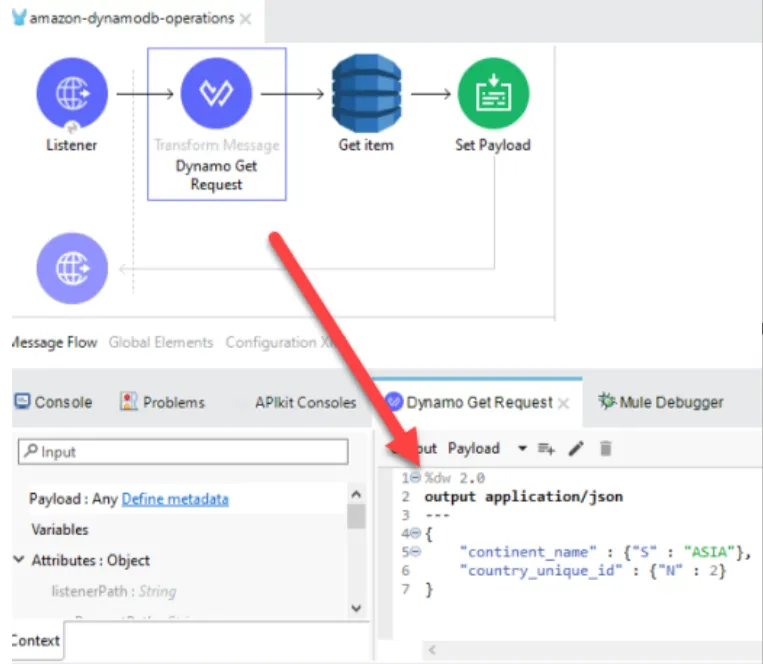
The GetItem operation returns a set of attributes for the item with the given primary key. If there is no matching item GetItem does not return any data.
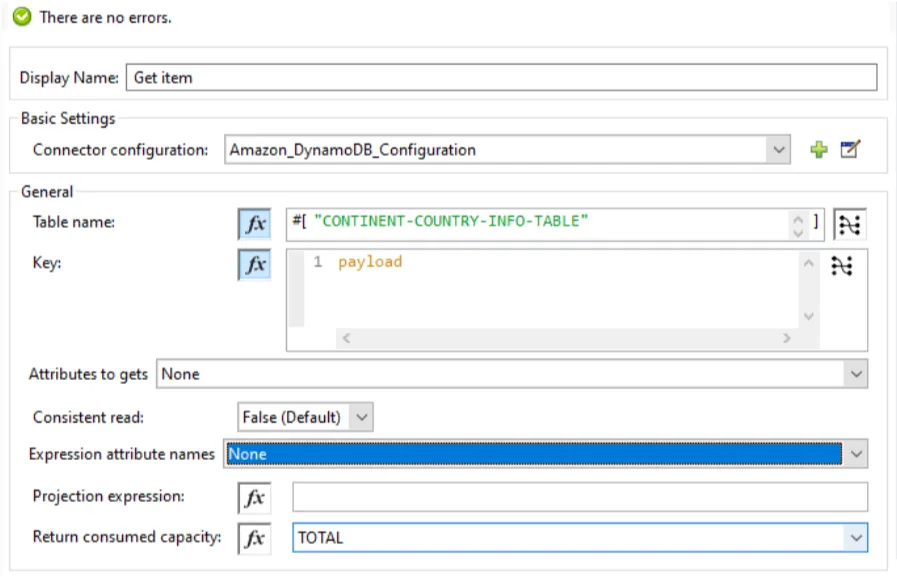
Request
Let’s now fetch the record from table CONTINENT-COUNTRY-INFO-TABLE, having continent = ‘ASIA’ & country unique id = ‘2’.
%dw 2.0
output application/json
---
{
	"continent_name" : {"S" : "ASIA"},
	"country_unique_id" : {"N" : 2}
}
Response
Once you execute the above flow, you will see the respective records in response.
8. Batch Get Item - Single Table
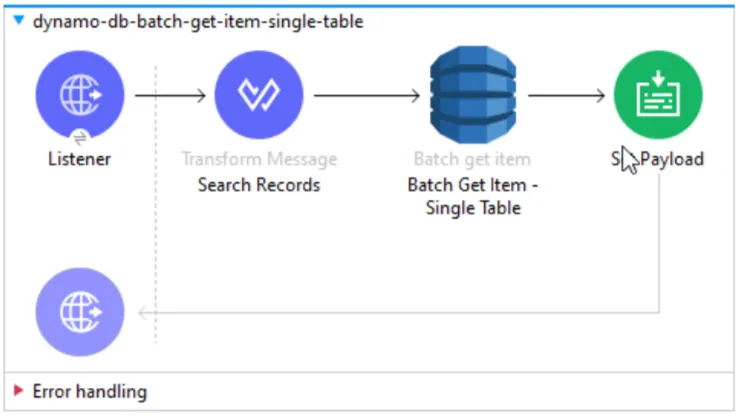
The Batch Get Item operation returns the attributes of one or more items from one table. You identify the requested item by primary key and sort key combination.
![Batch get item config with Request items set to the Expression #[payload] and Return consumed capacity TOTAL.](/_astro/amazon-dynamodb-connector-operations-in-mule-4-part-1-15.CWa6Zgv2_Z11QLzh.webp)
Request
Let’s now fetch two records from table CONTINENT-COUNTRY-INFO-TABLE , having continent = ‘ASIA’ & ‘Europe’ & country unique id = ‘1’ & ‘4’.
{
	"CONTINENT-COUNTRY-INFO-TABLE" : {
        		"Keys": [
            		{
               			"continent_name" : {"S":"ASIA"} as Object {class:"org.mule.extension.dynamodb.api.model.AttributeValue"},
               			"country_unique_id":{"N": 1} as Object {class:"org.mule.extension.dynamodb.api.model.AttributeValue"}
               		},
               		{
               			"continent_name" : {"S":"Europe"} as Object {class:"org.mule.extension.dynamodb.api.model.AttributeValue"},
               			"country_unique_id":{"N": 4} as Object {class:"org.mule.extension.dynamodb.api.model.AttributeValue"}
               		}
         	]
      } as Object {class:"org.mule.extension.dynamodb.api.model.KeysAndAttributes"}
}
Response
Once you execute the above flow, you will see both these respective records in response.
9. Batch Get Item - Multiple Tables
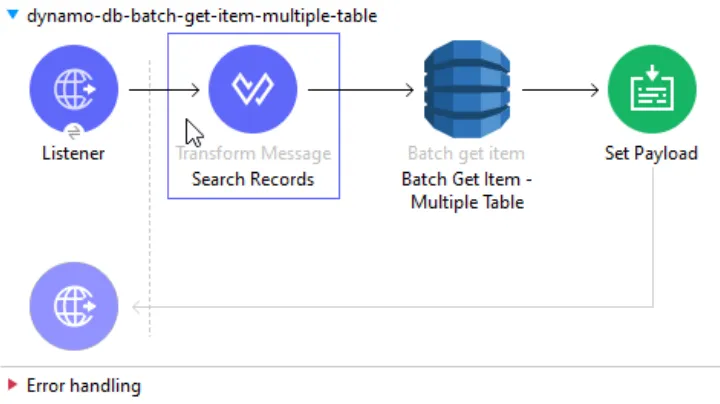
The Batch Get Item operation returns the attributes of one or more items from one or more tables. You identify the requested item by primary key.
![Batch get item config for multiple tables with Request items #[payload] and Return consumed capacity TOTAL.](/_astro/amazon-dynamodb-connector-operations-in-mule-4-part-1-17.CZl6aya5_Z21Mjeq.webp)
Request
Let’s now fetch two records each from table CONTINENT-COUNTRY-INFO-TABLE & COUNTRY-CLASIFIED-INFO-TABLE.
{
	"CONTINENT-COUNTRY-INFO-TABLE": {
		"Keys": [{
			"continent_name": {
				"S": "ASIA"
			} as Object {
				class:"org.mule.extension.dynamodb.api.model.AttributeValue"
			},
			"country_unique_id": {
				"N": 1
			} as Object {
				class:"org.mule.extension.dynamodb.api.model.AttributeValue"
			}
		},
               		{
			"continent_name": {
				"S": "ASIA"
			} as Object {
				class:"org.mule.extension.dynamodb.api.model.AttributeValue"
			},
			"country_unique_id": {
				"N": 2
			} as Object {
				class:"org.mule.extension.dynamodb.api.model.AttributeValue"
			}
		}]
	} as Object {
		class:"org.mule.extension.dynamodb.api.model.KeysAndAttributes"
	},
	"COUNTRY-CLASIFIED-INFO-TABLE": {
		"Keys": [{
			"country_unique_id": {
				"N": 1
			} as Object {
				class:"org.mule.extension.dynamodb.api.model.AttributeValue"
			}
		},
               		{
			"country_unique_id": {
				"N": 2
			} as Object {
				class:"org.mule.extension.dynamodb.api.model.AttributeValue"
			}
		}]
	} as Object {
		class:"org.mule.extension.dynamodb.api.model.KeysAndAttributes"
	}
}
Response
Once you execute the above flow, you will see both these respective records from each table, in the response.
10. Update Item
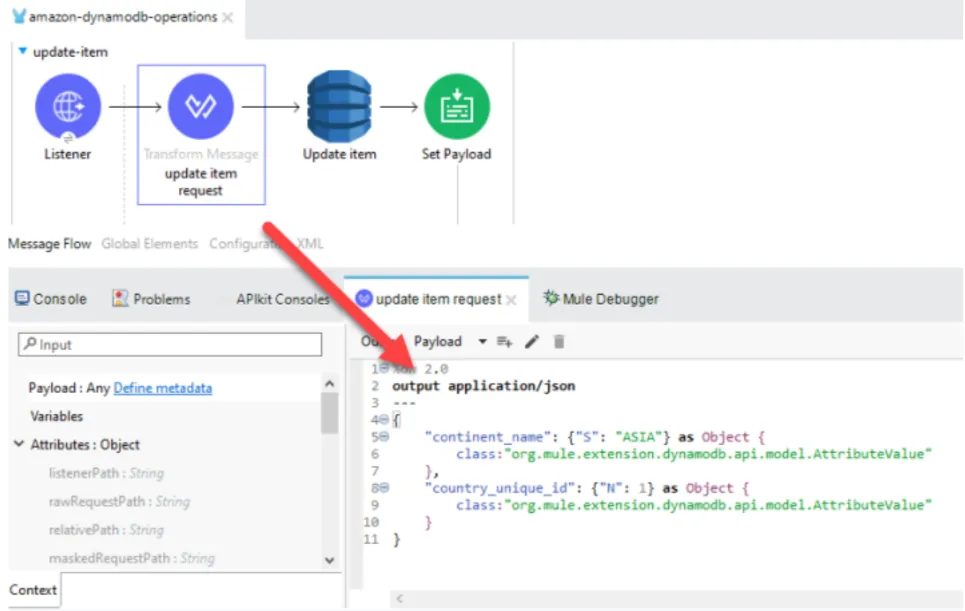
This operation edits an existing item’s attributes or adds a new item to the table if it does not already exist.
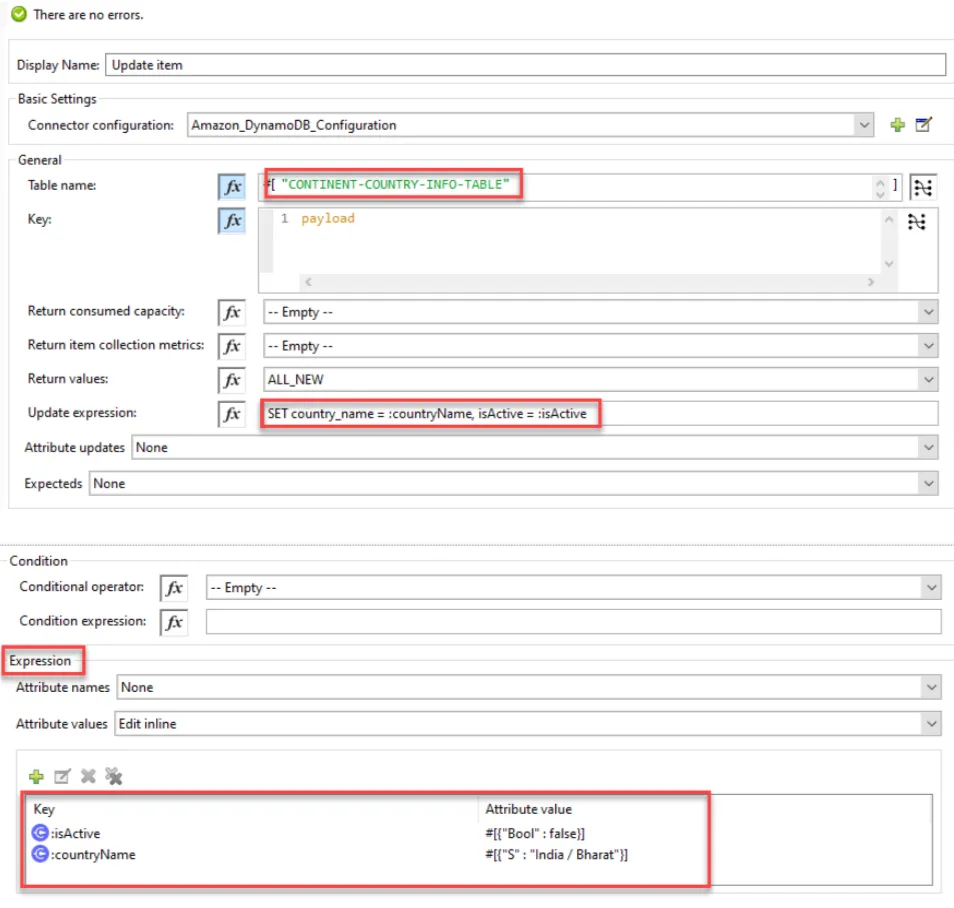
Request
Let’s now update the record with country name “India” with:
isActive = 'false'country_name = 'India/Bharat'
%dw 2.0
output application/json
---
{
	"continent_name": {"S": "ASIA"} as Object {
		class:"org.mule.extension.dynamodb.api.model.AttributeValue"
	},
	"country_unique_id": {"N": 1} as Object {
		class:"org.mule.extension.dynamodb.api.model.AttributeValue"
	}
}
Response
Once the above request is served, both these columns (isActive & country_name) will be updated respectively with the new values.
11. Query
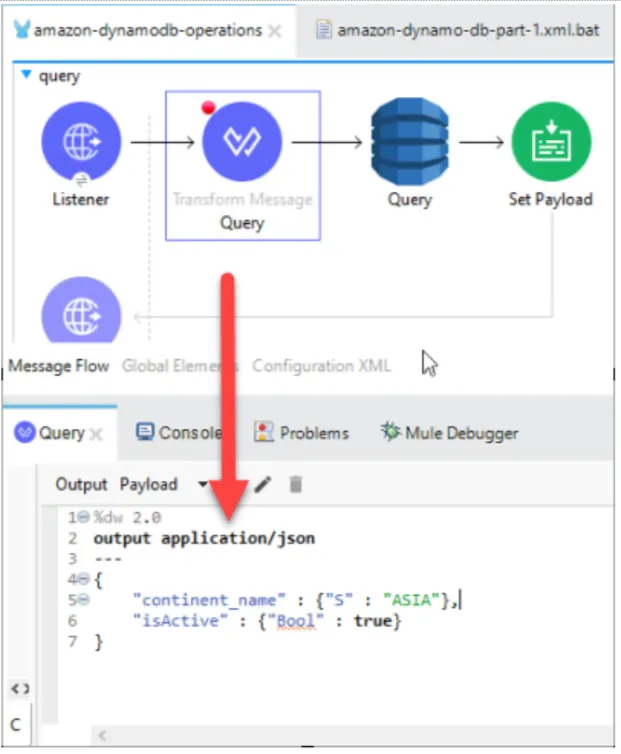
The Query operation finds items based on primary key values. You can query any table that has or secondary index that has a composite primary key (a partition key and a sort key).
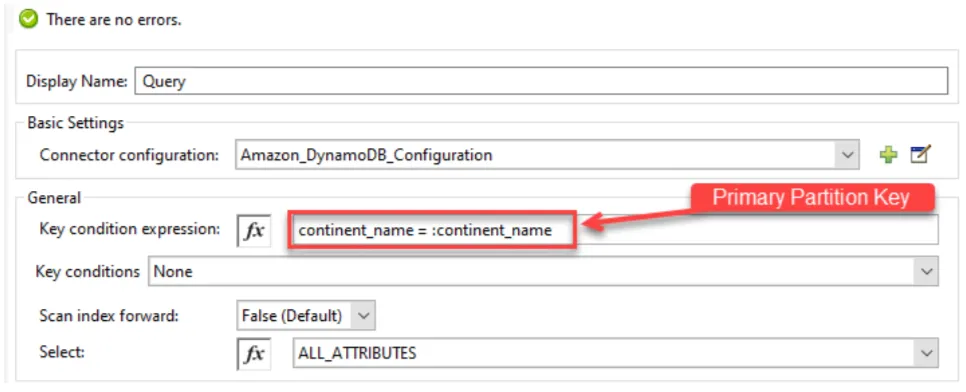
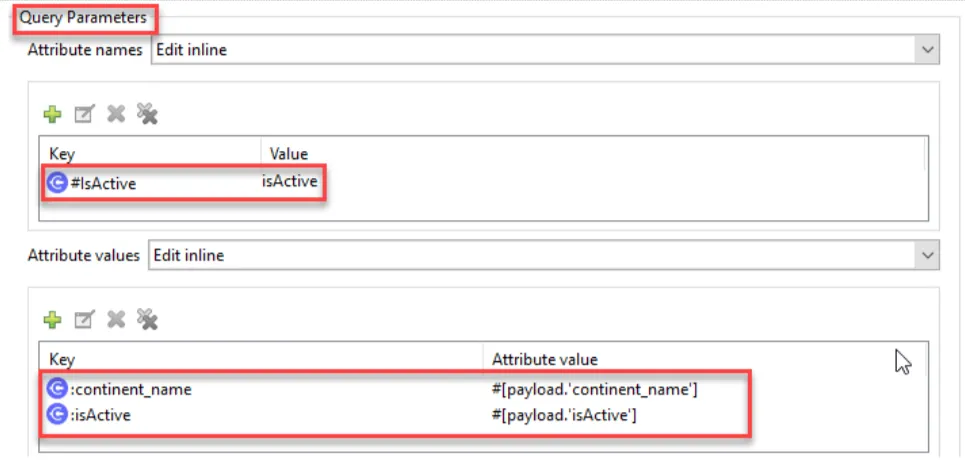
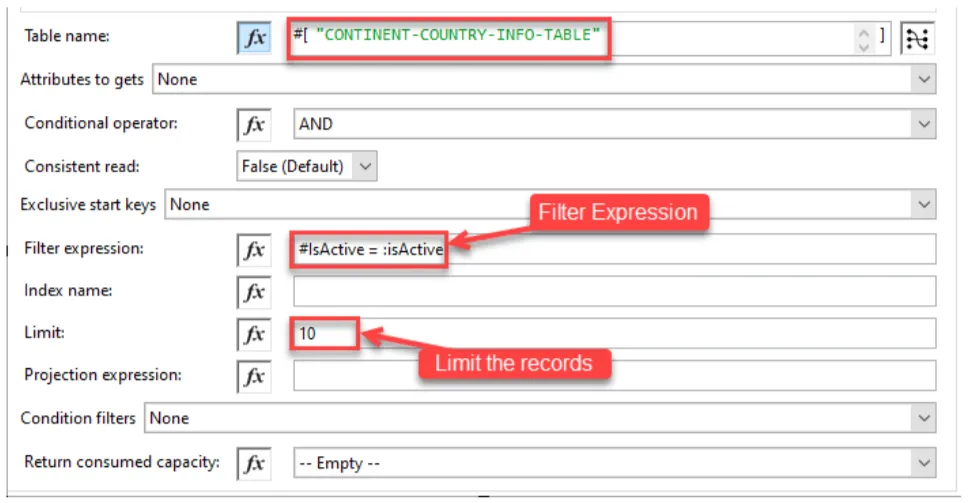
Request
Now, Let’s query the table CONTINENT-COUNTRY-INFO-TABLE and fetch all the records that satisfy the following criteria:
continent_name = 'ASIA'isActive = 'true'
%dw 2.0
output application/json
---
{
	"continent_name" : {"S" : "ASIA"},
	"isActive" : {"Bool" : true}
}
Response
Once you execute the above flow, you will find 3 records in the response.
12. Scan
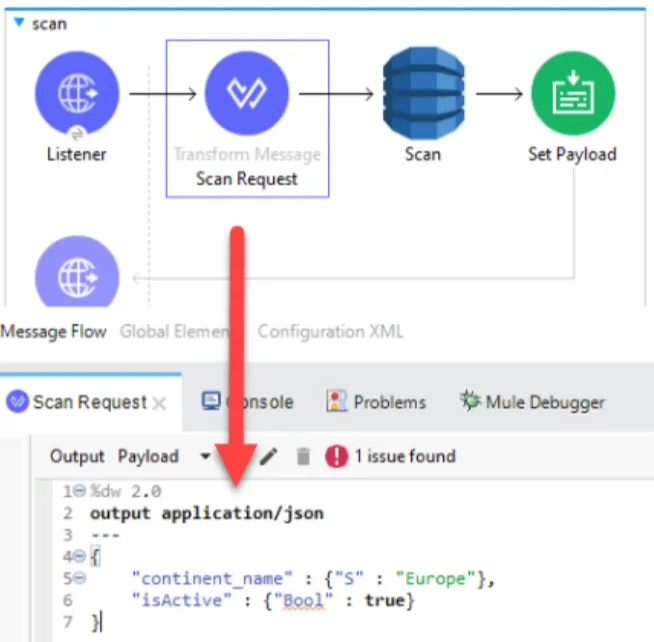
The scan operation returns one or more items or item attributes By accessing every item in a table or secondary index. To have DynamoDB return fewer items, you can provide a FilterExpression operation.
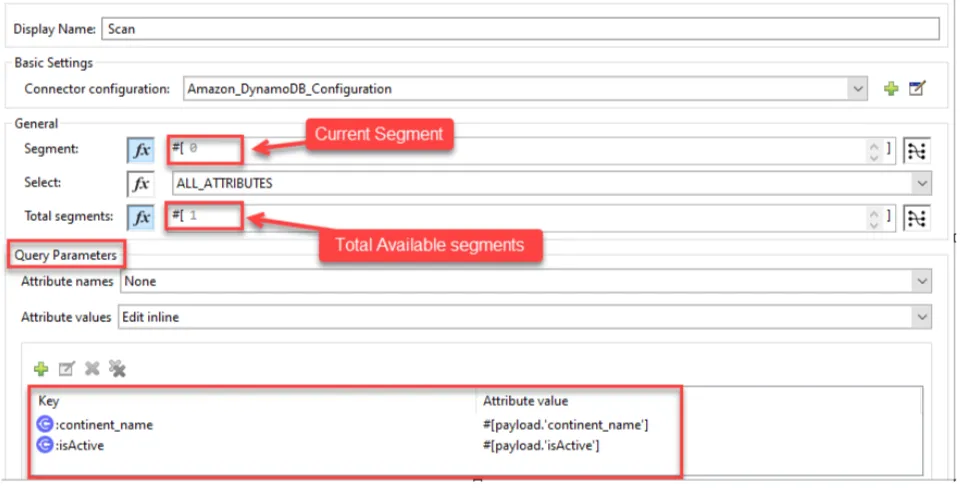
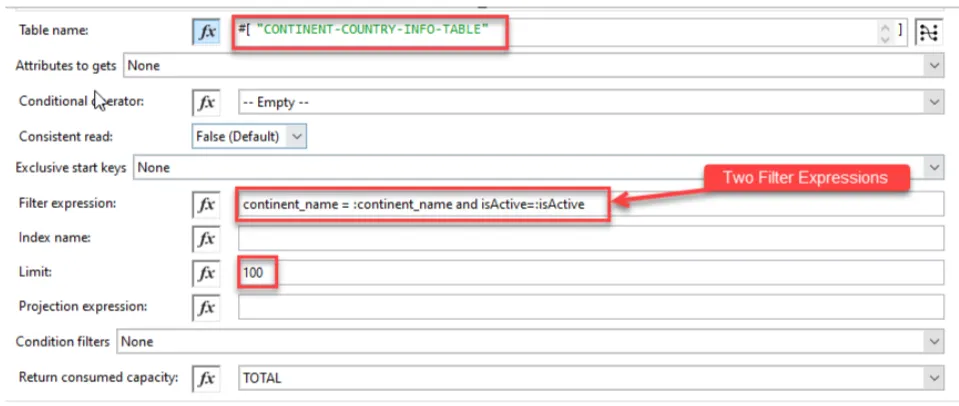
Request
Let’s scan the table CONTINENT-COUNTRY-INFO-TABLE and fetch all the records that satisfy the following criteria:
continent_name = 'Europe'isActive = 'true'
%dw 2.0
output application/json
---
{
	"continent_name" : {"S" : "Europe"},
	"isActive" : {"Bool" : true}
}
Response
Once you execute the above flow, you will find only 1 record in response.
13. Delete Item
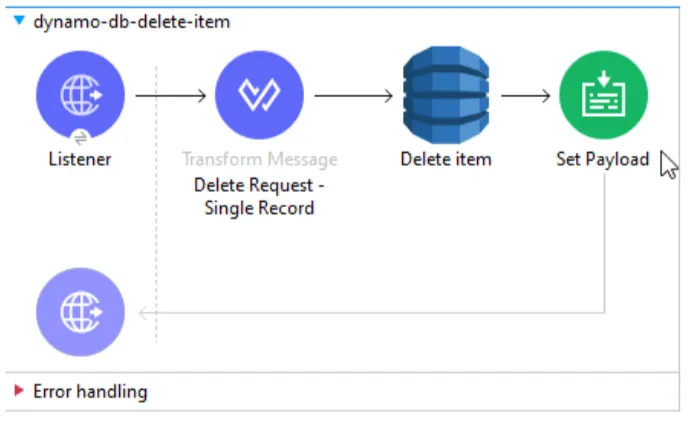
This operation deletes a single item in a table. Items are identified using primary key and sort key combination.
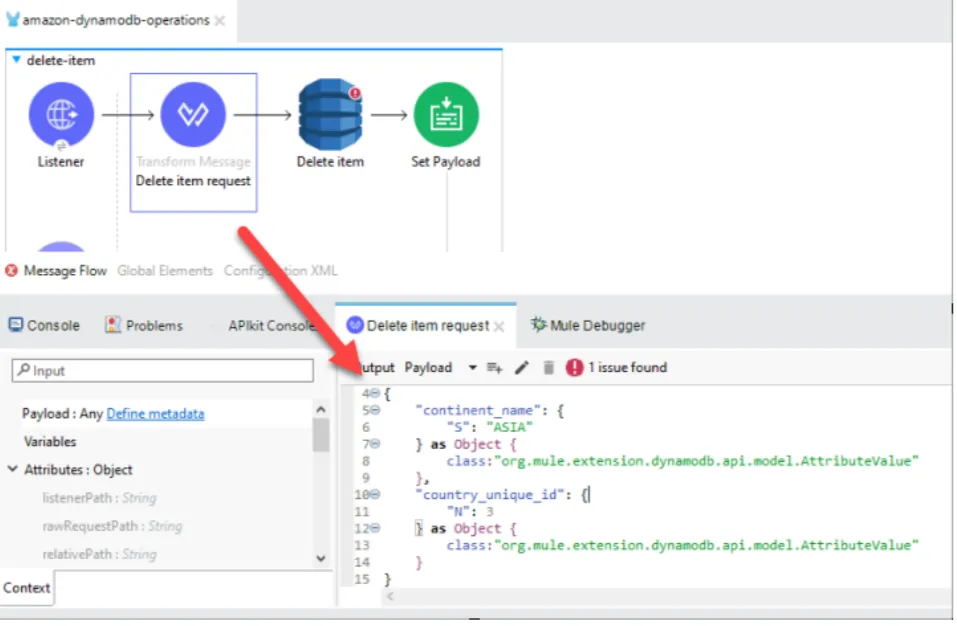
Request
Let’s now delete the record with country = ‘Japan’ from table CONTINENT-COUNTRY-INFO-TABLE
%dw 2.0
output application/json
---
{
	"continent_name": {
		"S": "ASIA"
	} as Object {
		class:"org.mule.extension.dynamodb.api.model.AttributeValue"
	},
	"country_unique_id": {
		"N": 3
	} as Object {
		class:"org.mule.extension.dynamodb.api.model.AttributeValue"
	}
}
Response
Once executed, the record will be deleted from the table.
14. Batch Delete Item - Single Table
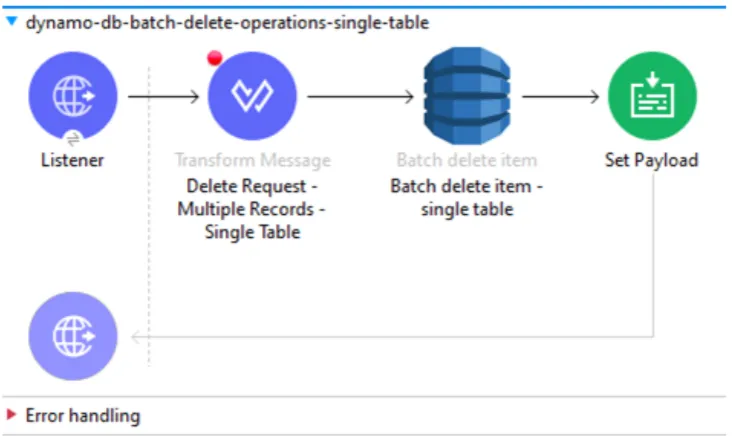
This operation deletes multiple items in one table.
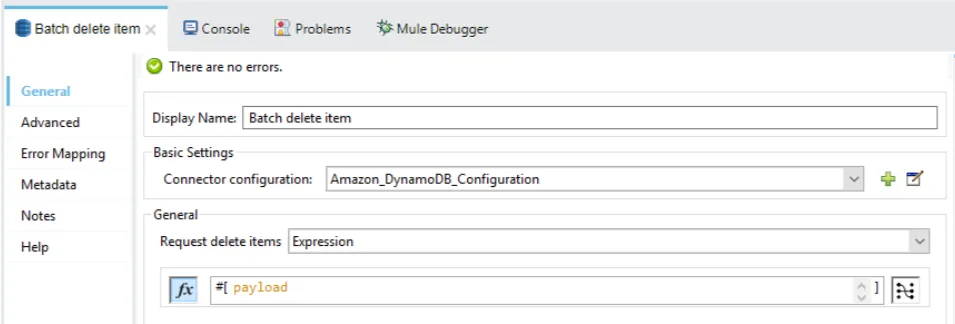
Request
We’ll now delete 2 records in a single request. Let’s delete both countries “Singapore” & “Switzerland” from the table CONTINENT-COUNTRY-INFO-TABLE.
{
	"CONTINENT-COUNTRY-INFO-TABLE": [{
		"DeleteRequest": {
			"continent_name": {
				"S": "ASIA"
			} as Object {
				class: "org.mule.extension.dynamodb.api.model.AttributeValue"
			},
			"country_unique_id": {
				"N": "2"
			} as Object {
				class: "org.mule.extension.dynamodb.api.model.AttributeValue"
			}
		}
	} as Object {
		class : "org.mule.extension.dynamodb.api.model.WriteRequest"
	},
{
		"DeleteRequest": {
			"continent_name": {
				"S": "Europe"
			} as Object {
				class: "org.mule.extension.dynamodb.api.model.AttributeValue"
			},
			"country_unique_id": {
				"N": "4"
			} as Object {
				class: "org.mule.extension.dynamodb.api.model.AttributeValue"
			}
		}
	} as Object {
		class : "org.mule.extension.dynamodb.api.model.WriteRequest"
	}]
}
Response
Once executed, both these records will have been deleted from the table.
15. Batch Delete Item - Multiple Tables
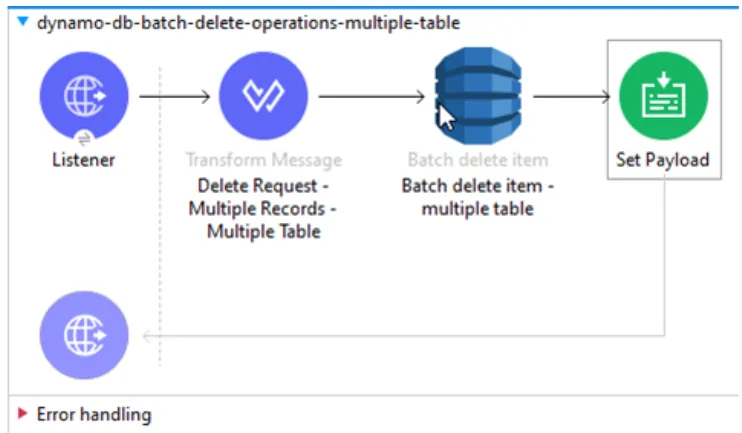
This operation deletes multiple items from multiple tables.
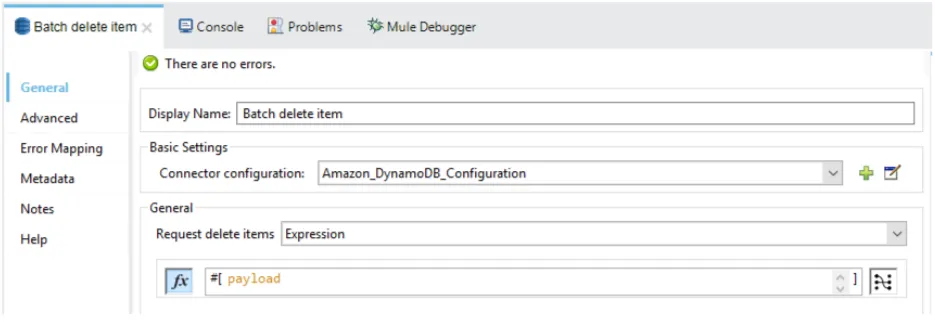
Request
We’ll delete country ‘India’ from table CONTINENT-COUNTRY-INFO-TABLE and its classified information from the table COUNTRY-CLASIFIED-INFO-TABLE.
{
	"CONTINENT-COUNTRY-INFO-TABLE": [{
		"DeleteRequest": {
			"continent_name": {
				"S": "ASIA"
			} as Object {
				class: "org.mule.extension.dynamodb.api.model.AttributeValue"
			},
			"country_unique_id": {
				"N": 1
			} as Object {
				class: "org.mule.extension.dynamodb.api.model.AttributeValue"
			}
		}
	} as Object {
		class : "org.mule.extension.dynamodb.api.model.WriteRequest"
	}
],
	"COUNTRY-CLASIFIED-INFO-TABLE": [{
		"DeleteRequest": {
			"country_unique_id": {
				"N": 1
			} as Object {
				class: "org.mule.extension.dynamodb.api.model.AttributeValue"
			}
		}
	} as Object {
		class : "org.mule.extension.dynamodb.api.model.WriteRequest"
	},
{
		"DeleteRequest": {
			"country_unique_id": {
				"N": 3
			} as Object {
				class: "org.mule.extension.dynamodb.api.model.AttributeValue"
			}
		}
	} as Object {
		class : "org.mule.extension.dynamodb.api.model.WriteRequest"
	}]
}
Response
Once executed, all 3 records will have been deleted from both tables.
Conclusion
We have seen the working examples of 15 operations of DynamoDB connectors.
Stay tuned for the next part.
Thank you and happy learning!!
FAQs
Frequently asked questions about this post.
-
What problem does this post solve that the official connector docs don't?
The post notes there is a lot of documentation on the Amazon DynamoDB Connector's usage, but none could be found that specifically shows how to structure the JSON requests, which are required for all DynamoDB connector operations. So it explains every operation along with its JSON request through simple use case scenarios.
-
Which DynamoDB connector operations are covered in Part 1?
Part 1 covers 15 operations: Create Table, Describe Table, List Tables, Put Item, Batch Put Item (single and multiple tables), Get Item, Batch Get Item (single and multiple tables), Update Item, Query, Scan, Delete Item, and Batch Delete Item (single and multiple tables).
-
What is the difference between Put Item and Update Item?
Put Item creates a new item or replaces an existing one, so if an item with the same primary key already exists it is replaced entirely. Update Item edits an existing item's attributes (or adds a new item if it does not already exist), so in the example only the
isActiveandcountry_namecolumns are changed rather than the whole record. -
How is the composite primary key set up for the CONTINENT-COUNTRY-INFO-TABLE?
It uses a composite primary key combining a partition key and a sort key, where
continent_nameis the Primary Partition Key andcountry_unique_idis the Primary Sort Key. The post explains this gives extra flexibility when querying, for example providing onlycontinent_nameretrieves all thecountry_unique_idvalues associated with it. -
What's the difference between the Query and Scan operations here?
Query finds items based on primary key values on a table or secondary index that has a composite primary key, while Scan returns items by accessing every item in a table or secondary index and can narrow results with a FilterExpression. In the examples the Query on
continent_name = 'ASIA'andisActive = 'true'returns 3 records, whereas the Scan oncontinent_name = 'Europe'andisActive = 'true'returns only 1 record. -
Why do the batch request examples include `as Object {class:"org.mule.extension.dynamodb.api.model.AttributeValue"}`?
In the batch operations the DataWeave request casts each attribute value with
as Object {class:"org.mule.extension.dynamodb.api.model.AttributeValue"}, and wraps each PutRequest or DeleteRequest asorg.mule.extension.dynamodb.api.model.WriteRequest(and key sets asKeysAndAttributes), which is how the request is structured for the connector's batch put, get, and delete operations.